Monitor Placement
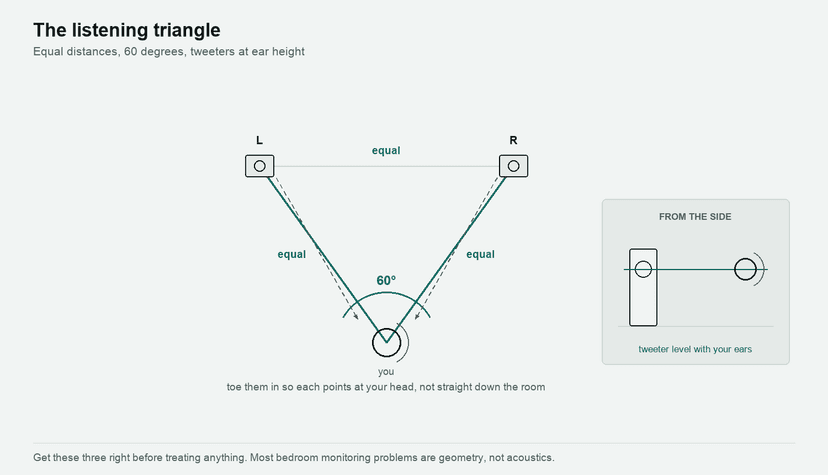
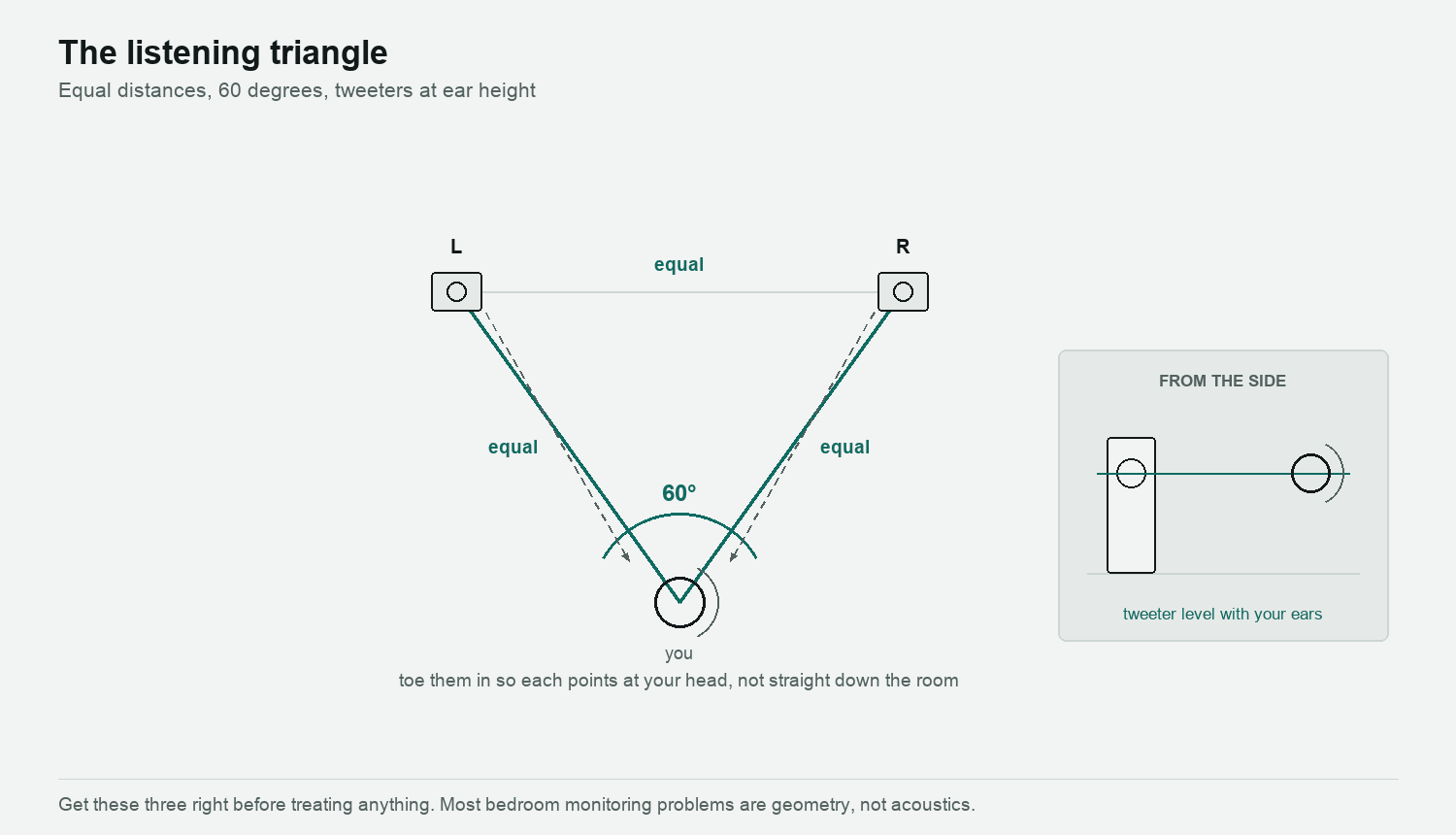
Typically you should be situating yourself and the two monitors at each corner of an equilateral triangle – pictured below – with you head positioned at the same distance apart from the speakers as they are from each other. Depending on the room’s dimensions and acoustics, you should give yourself between 1 and 2.5 meters (3 – 8 feet) distance from your monitors. They should be mounted symmetrically and on secure stands that will place the height of your speakers’ tweeters roughly at the same level as your ears. If this is not possible then you should bear in mind that it is preferable to situate your speakers closer together than further away. If you position your speakers too widely then you can experience a gap in the stereo image, making acoustic placement and accurate panning unachievable.
The majority of speakers are designed to be used away from side or back walls, but if that is not going to be an option for you, then it is generally better to place them to the back wall as opposed to the sides. You should avoid the corners altogether since this will push all of the negative reflections to the front, resulting in the undesirable phase shift that we covered earlier. If you are considering mounting your cabinets on a back wall, then it is essential that they are not rear-ported since the close proximity to the walls will prevent the ports from operating in the way that they were intended, resulting in an uneven bass representation. The perceived bass output will greatly increase and so you need to ensure that any bass-heavy speakers are not used in this way, otherwise you will be tempted to significantly under- compensate the true bass output in your mix.
Once you have decided upon your placement choice, you will need to pay close attention to a secure and reliable mounting arrangement. Good solid mounting will prevent your speakers from sounding dissatisfying with unexpected results, and it may be worth noting that spiked loudspeaker stands have become the standard. A good little trick is to place a small piece of blue-tack underneath each speaker corner, as this will help stop them from moving around. Stands that are designed to stand on the floor should be used with – and most will have this already – a spike kit, which will help prevent movement, and are particularly desirable if the floor is carpeted.
You have probably noticed that most monitors have been designed to a specific orientation – i.e. bass, mids, and tweeters at the top – so, without wanting to state the obvious, please make sure that you place them the right way up! I have not come across anyone who has positioned them upside down, but plenty of people position them on their sides – and this can result in grievous effects on the frequency response and stereo imaging.
Another facet for you to consider is the direction in which the speakers are pointing. Whilst many designs – Genelec monitors by way of example – are intended to point directly at the listener. You might hear this being referred to as a degree of ‘toe-in’, but many of the other designs are intended to face forward into the room, placing the listener a little off-axis to each of the monitors. If speakers of this type are directed at the listener then the sound quality will appear brighter then intended.
The precision of the stereo image and central image stability can be drastically effected by the degree of ‘toe- in’ or ‘toe-out’, so you should try optimizing the accuracy of the imaging, and the stability of the central image (or ‘sweet spot’) by experimenting with small changes in the angle of your monitors.
Monitoring Tips
- · Your ears may lie to you if you have been listening to the same mix over and over again, especially at loud volumes. You can begin to suffer from ear fatigue and you will lose your ability to make valued judgements. Make sure that you reference against another commercial track of the same genre, but do not rely too heavily upon it. It is what it says – a reference and not a duplicate.
- · Test your mix periodically from outside of the studio or bedroom. For some reason this can draw attention to discrepancies in the mix that sitting in front of your system is not always able to highlight.
- · Checking your mix on headphones is advisable from time to time because they are able to reveal distortion or clicks more readily then a monitoring system. But again, do not rely too heavily on them since they represent the stereo field in a different way to your speakers and can be notoriously bad at representing low frequencies accurately.
- · When mixing try to do so without looking at the visual arrangement on the arrange page. Looking at the audio or midi parts as they move along the mix will interfere with your ability to make reliable judgements on the sonic quality of your productions, so if applicable turn the screen off or close your eyes.Listen to the mix again with fresh ears the next day as you will probably encounter some issues that your ear did not pick up on after a long session the night before. And, of course, avoid mixing while intoxicated as this will severely hamper your ability to mix properly!
Mixing on headphones
Most people now do at least part of the job on headphones, and a lot of the audience will hear the result on them. Treating headphones as the cheap option is out of date — but they are not small speakers, and they lie in specific, learnable ways.
What they are better at. Detail, edits, clicks, noise, breaths, the reverb tail you cannot hear over a room. No room colouration at all, and no neighbours. For anything surgical, headphones win.
What they get wrong. On speakers, each ear hears both boxes — slightly delayed and filtered by your head. On headphones each ear hears only its own channel, so the stereo image is wider than reality and sits inside your skull rather than in front of you. Panning decisions made on headphones are routinely too narrow when played on speakers, because everything already sounded wide enough.
Low end is the other one. A pair of headphones can show you a 30 Hz rumble your monitors cannot reproduce — and can equally flatter a bottom end that will be far too heavy in a room.
- Use crossfeed. A crossfeed plug-in feeds a little of each channel to the other ear with a short delay, approximating what speakers do. It makes the image sit in front of you and makes width judgements transferable.
- Check width on speakers before committing, even briefly.
- Check bass on something small - a phone speaker, a laptop - as well as on the headphones.
- Learn one pair properly. Familiarity beats specification. A mix engineer who knows exactly how their ten-year-old headphones lie will out-mix someone on unfamiliar flagships.
The practical answer is not one or the other. Balance and width on speakers, detail and cleanup on headphones, and check both before you call it finished.
Do this now
- Set up the equilateral triangle properly - tweeters at ear height, same distance to each ear as between the speakers.
- Play a familiar mono track and move your head six inches left and right. The centre image should collapse, not wander.
- Now pull the speakers 20 cm further from the back wall and listen to the bass again.
That last step usually does more for the low end than any plug-in you were about to buy.