Drop a finished stereo track in and get the parts back out: vocals, drums, bass, guitar, piano, and everything else. No stems needed, no multitrack, just the mixdown.
Needs a Mac with an M1 or later Apple silicon processor. It will not appear on an Intel machine.
Split a track
- Control-click the audio region in the Tracks area.
- Choose Processing > Stem Splitter.
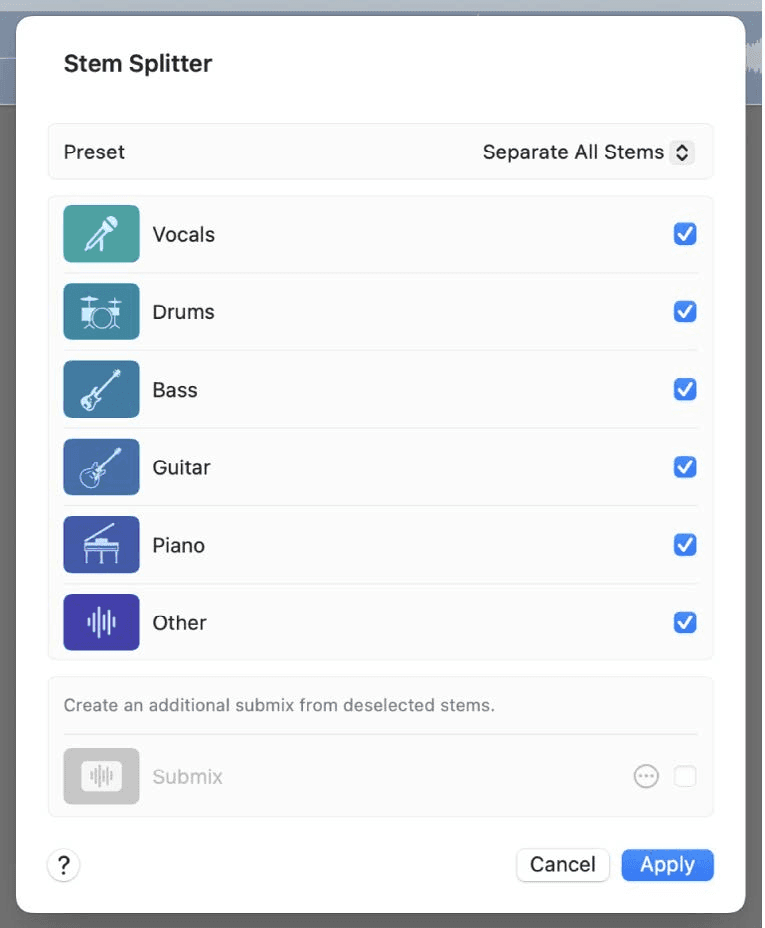
- Pick a preset, or tick the stems you want separated.
- Click Apply.
The presets are named for what they separate and what they fold together, so Separate All Stems gives you six parts, and the narrower presets give you the one or two you actually want plus everything else combined.
The submix is the part people miss
Anything you leave unticked gets combined into a Submix. Tick the Submix checkbox to extract that too, or click its More button and deselect individual stems you do not want included in it.
This matters because the submix is usually higher quality than the individual stems. Separating vocals from everything-else is an easier job than separating six parts, so if all you need is an acappella and a backing track, ask for exactly that rather than taking all six and remixing them.
What you get
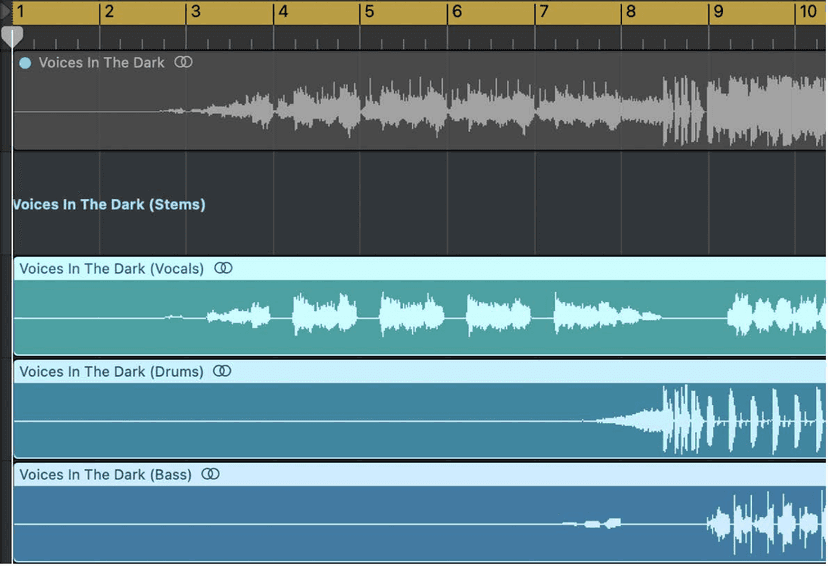
A summing stack under the original track, one subtrack per stem. The original region is muted so you hear the split immediately. Solo them, move them, chop them, treat them like any other audio - they are ordinary regions on ordinary tracks.
If you use it constantly, assign the presets to key commands. They exist but are unassigned out of the box, so you can split a selected region without opening the window at all.
What to do once it has split
The stems arrive as regions on live subtracks, which is not where you want to leave them if you are building on top:
- Bounce in place the stems you are keeping. It commits them to their own audio files, gets the summing stack out of your way, and means the split is not recalculated.
- Delete the stems you did not want. A six-way split you only needed the vocal from is five tracks of artefacts waiting to be soloed by accident.
- Check the tempo before you warp. A stem inherits the original recording's timing, so set the project tempo to the track, or flex the stems, before you start layering.
- Keep the original region. It is muted, not deleted - and it is your reference for whether the split lost something.
What we actually use it for
- Remixes - pull the vocal off a track and build something new underneath it.
- Sampling - isolate a drum break that was buried under a full mix, or lift a single chord stab that always had a vocal over it.
- Practice - strip the vocal and sing it, or strip everything but the drums and play along.
- Reference checking - solo the bass on a record you love and hear what it is actually doing, rather than guessing through the rest of the mix.
- Rescue work - a client brings a bounce and no session. Not ideal, but better than no.
What it is actually doing, and where that shows
It is not unmixing. The model is making an informed guess at what each part looked like before they were summed, and reconstructing it. That guess is very good on modern, well-separated productions and gets worse as the mix gets denser, louder and more compressed.
What to listen for:
- Reverb and delay go with whatever they were on - a vocal stem usually brings its own tail, which is fine, and sometimes brings part of the room the drums were in, which is not.
- Cymbals and sibilance are where artefacts show first. Solo a drum stem and listen to the hats.
- Anything doubled - a guitar and a synth playing the same line often come out mixed together, because there is genuinely no information saying which was which.
- Low end separates well. Bass stems are usually the most usable thing you get.
For remix and sampling work none of that matters much - the artefacts sit under your new production. For anything going out as a finished master, listen hard on headphones before you commit.
Before you build a release on it
Splitting somebody else's record does not give you the right to release what you make from it. That is the same conversation as sampling, and it is covered in Sampling: History & Copyright Laws - read that one before the thing you are making becomes something you want to put out.
Do this now
- Take a finished stereo mix of your own and split it.
- Solo each stem in turn and listen for the artefacts on the vocal.
- Now use the submix rather than the individual stems and hear the difference.
The submix is the part people miss, and it is usually the one that is actually usable.