Where music comes from, getting it into rekordbox and on-grid, the Camelot wheel, exporting to USB, and a first go on the players.
Where to get music, and what to get
A DJ library is bought, not streamed. Club players read files from a USB stick, so what you own is what you can play.
- Beatport — the biggest electronic store. Every release offered as MP3, WAV or AIFF; the lossless versions cost more.
- Juno Download — same idea, often cheaper on lossless, strong on UK and older catalogue.
- Bandcamp — sold by the artist or label directly. Lossless is included in the price, and almost all of the money reaches them. Bandcamp Fridays waive the platform fee.
- Traxsource — house, soulful, deep and afro. If that is your lane it has releases the others miss.
- DJ pools and subscriptions — DJcity, BPM Supreme, ZIPDJ and the like: a monthly fee for edits, extended versions and acapellas, aimed at open-format and commercial DJs. Beatport LINK streams into rekordbox, but streamed tracks do not export to a USB — fine on a laptop, useless on a club CDJ without a subscription and an internet connection.
File formats, in one paragraph
WAV and AIFF are uncompressed: full quality, roughly 10 MB a minute. FLAC and ALAC are the same audio losslessly squeezed to about half the size, and the CDJ-3000 plays both. MP3 at 320 kbps is compressed and will not embarrass you in a club; anything lower, or ripped from a video site, will. Buy lossless if you can afford it, 320 if you cannot, and never 128.
Setting up rekordbox
- Install rekordbox and sign in with an AlphaTheta account. The free plan covers everything this course needs: library, analysis and export to USB.
- Stay in Export mode — the library-management side. Performance mode is for DJing from the laptop, which is not what a club booth is.
- Preferences > View > Waveform: set the colour to RGB (or 3Band, which the CDJ-3000 also draws). Blue waveforms show you loudness; RGB shows you what the loudness is made of — kick, bass, vocals — which is what you need to see before a mix.
- Preferences > View > Key display: switch from Classic (Am, F#m) to Alphanumeric (8A, 11A). The numbers make harmonic mixing arithmetic instead of theory.
- Right-click the column headers and choose what the list shows: BPM, Key, Rating, Colour, Date Added, My Tag. Hide the rest.
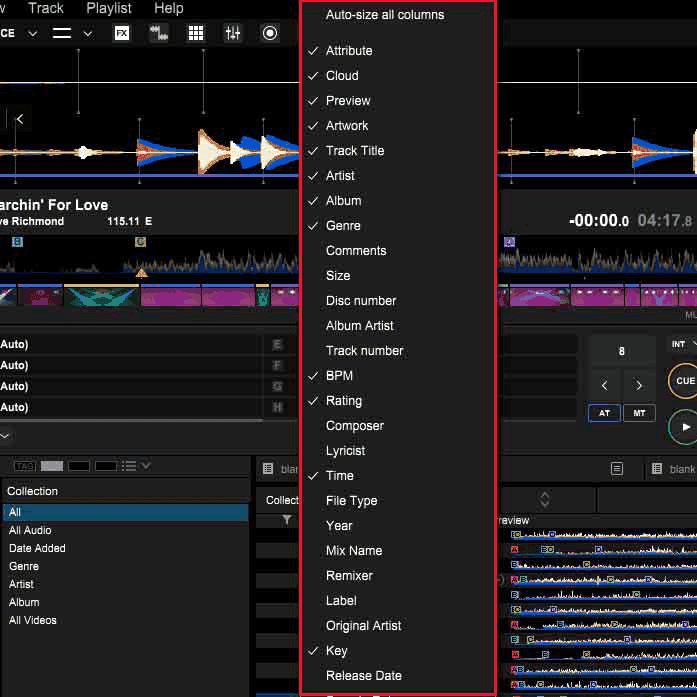
Column menu. Show what you decide with, hide what you do not.
Importing and playlists
Drag a folder onto Collection. rekordbox analyses each file for BPM, beat grid, key and waveform — leave it running. Then build playlists from the collection: a playlist is a pointer to a track, not a copy, so a track can sit in ten of them. Use folders to group playlists by night, genre or energy.
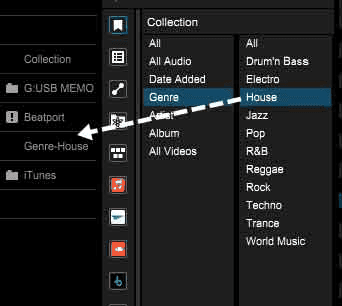
Browse by genre, artist or BPM without touching a playlist.
The first beat, and what 4/4 means
Nearly all dance music is in 4/4: four beats to a bar, the kick usually on every one, the snare or clap on two and four. Bars group into phrases of four, eight and sixteen. Everything a DJ does — cueing, looping, mixing in — hangs off beat one of the bar, so the first job with any track is to find it and mark it.
Putting every track on the grid
The beat grid is rekordbox's map of where the beats are. Sync, quantise, loops and hot cues all rely on it, and analysis gets it wrong often enough that you check every track.
- Load the track in Export mode and open the GRID EDIT panel.
- Play from the start. If the grid lines land on the kicks, you are done. If they drift, they are a fraction off.
- Set the first beat: pause on the first kick and tap set grid (the metronome click helps).
- Use the shift arrows to nudge the whole grid, or the BPM field if the tempo is wrong. ×2 and ½ fix a grid analysed at half or double speed.
- Lock the grid when it is right so a re-analysis cannot undo it.
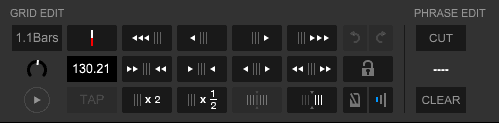
GRID EDIT. The tap and shift controls fix most tracks in seconds.
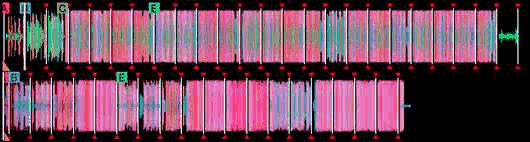
A good grid: every line on a kick.
Troubleshooting. Live drums, old disco and anything recorded to tape drift in tempo, so one grid will not fit. Set Preferences > Analysis to Dynamic for those and re-analyse: rekordbox then follows the tempo changes. A track that analyses at 87 when it is obviously 174 is a half-time error — press ×2.
Harmonic mixing and the Camelot wheel
Two tracks in compatible keys mix without the bassline of one grinding against the melody of the other. The Camelot wheel turns the twenty-four keys into a clock: 1–12 around the face, A for minor and B for major.
- Same code (8A → 8A): always safe.
- One step either way (8A → 7A or 9A): safe, the classic move.
- Same number, other letter (8A → 8B): minor to its relative major. Safe, changes the mood.
- +2 (8A → 10A): an energy lift. Usually works, not always.
- Anything else: mix on drums only, or accept that it will clash.
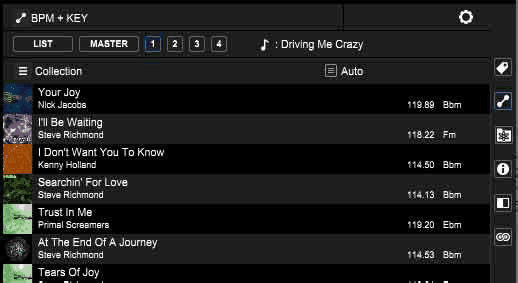
The BPM + KEY related-tracks list: what will mix with what is playing.
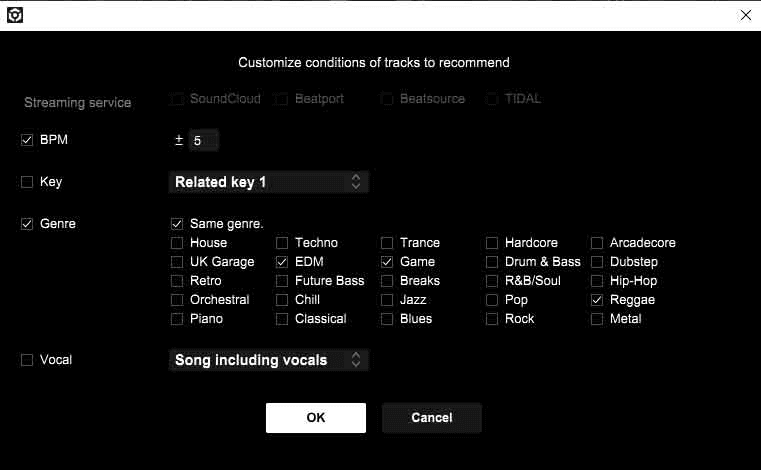
Set the conditions once and the list does the arithmetic for you.
Mixed In Key detects keys more reliably than rekordbox's own analysis and adds an energy level from 1 to 10. Run your files through it before importing, and turn off key analysis in rekordbox's Analysis preferences so it does not overwrite the result.
Exporting to USB
- Plug in a USB stick formatted FAT32 (see class 2). It shows up under Devices.
- Drag playlists onto the device, or tick Synchronize playlists with a device so the same lists are always mirrored.
- Wait for the transfer to finish — the waveforms and grids go over with the files.
- Eject from rekordbox, not by pulling the stick.
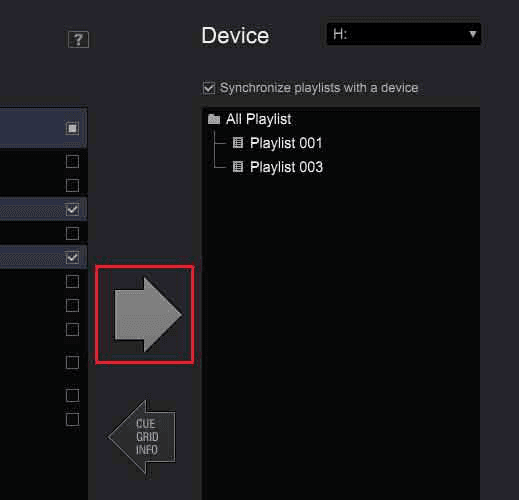
Sync playlists to a device: the same lists on the stick every time you export.
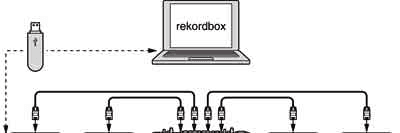
Prepared on the laptop, played on the decks. The laptop stays at home.
Every control on the CDJ
The CDJ-3000 is the player in most booths you will stand in. The layout is the same across the family, so learn it once.
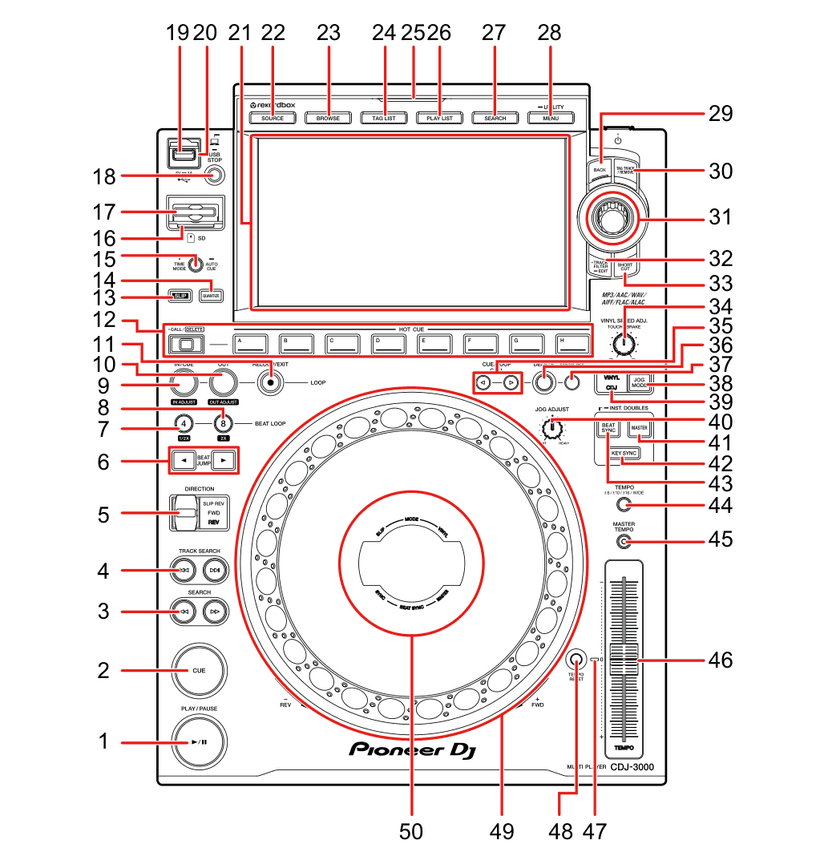
CDJ-3000 top panel. The ones you will use every set:
- 1 — PLAY/PAUSE
- 2 — CUE — sets and returns to the cue point
- 3 — SEARCH — scan within the track
- 4 — TRACK SEARCH — previous / next track
- 5 — DIRECTION — FWD, REV and SLIP REV
- 6 — BEAT JUMP — move by a set number of beats
- 7–8 — BEAT LOOP 4 and 8 — one-touch loops, with ½× and 2×
- 9–11 — LOOP IN / OUT / RELOOP-EXIT — manual loops
- 12 — HOT CUE A–H, with CALL / DELETE
- 13 — SLIP
- 14 — QUANTIZE
- 15 — TIME MODE / AUTO CUE
- 19–20 — USB slot and USB STOP — always press STOP before pulling a stick
- 22–28 — SOURCE, BROWSE, TAG LIST, PLAYLIST, SEARCH, MENU / UTILITY
- 31 — Rotary selector — scroll, press to load
- 35–38 — CUE/LOOP CALL, DELETE, MEMORY — memory cues and loops
- 39 — VINYL / CDJ jog mode
- 41–43 — BEAT SYNC, MASTER, KEY SYNC
- 44 — TEMPO range — ±6, ±10, ±16, WIDE
- 45 — MASTER TEMPO — keep the key when you change the tempo
- 46 — TEMPO slider
- 49 — Jog wheel — nudge on the edge, scratch on the top in VINYL mode
Every control on the mixer
The DJM-900NXS2 is the mixer in most of the same booths. Four identical channel strips down the middle, the master and booth section to their right, headphones and colour FX on the left, beat FX on the far right. Learn one strip and you know all four.
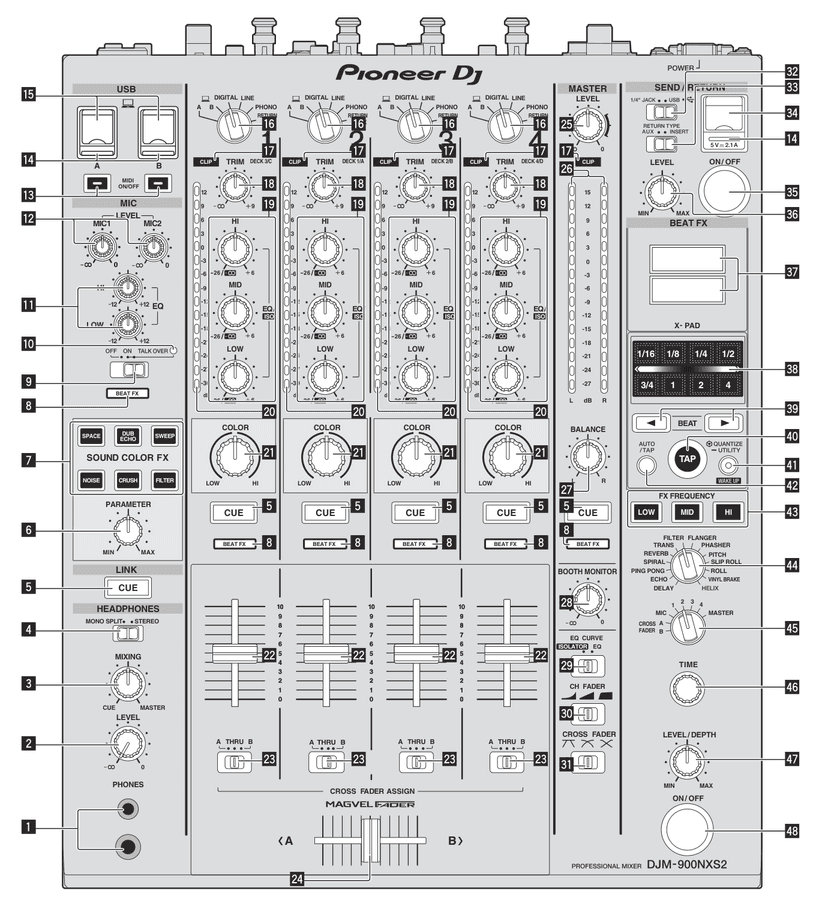
DJM-900NXS2 control panel. The ones you will use every set:
- 16 — Input selector — DIGITAL, LINE, PHONO or RETURN: which socket on the back the channel listens to
- 17 — CLIP — lights when the channel is being overloaded. Turn TRIM down
- 18 — TRIM — input level, set by the channel meter (class 2)
- 19 — EQ/ISO HI, MID, LOW — three bands per channel; full cut at the left
- 20 — Channel level indicator — the level before the fader
- 21 — COLOR — how much of the Sound Color FX this channel gets
- 5 — CUE — sends the channel to your headphones
- 22 — Channel fader
- 23–24 — CROSS FADER ASSIGN (A, THRU, B) and the crossfader itself
- 25–26 — MASTER LEVEL and the master meter — the room's volume
- 27–28 — BALANCE, and BOOTH MONITOR for the speakers in the booth
- 29–31 — EQ CURVE (isolator or EQ), channel-fader curve, crossfader curve
- 1–4 — PHONES socket, headphone LEVEL, MIXING (cue ↔ master), MONO SPLIT / STEREO
- 6–7 — SOUND COLOR FX buttons and their PARAMETER knob
- 37–48 — BEAT FX: display, X-PAD, BEAT ◀ ▶, TAP, QUANTIZE, AUTO/TAP, FX FREQUENCY, effect selector, channel selector, TIME, LEVEL/DEPTH, ON/OFF (class 5)
First mix: beatmatching, looping, EQ
- Beatmatching. Match the BPM on the tempo slider, cue the incoming track on beat one, press play on the outgoing track's beat one, then correct drift by nudging the jog edge. Sync exists; learn to do it without, because the day the grid is wrong is the day it matters.
- Looping. Press BEAT LOOP 4 and a four-bar loop starts on the next downbeat. ½× and 2× halve or double it. RELOOP/EXIT releases it. A loop buys you time.
- Mixing with EQ. Two full basslines at once is mud. Bring the incoming track in with its LOW cut, swap the basses on a phrase, then take the outgoing track's HI and MID down as it leaves.
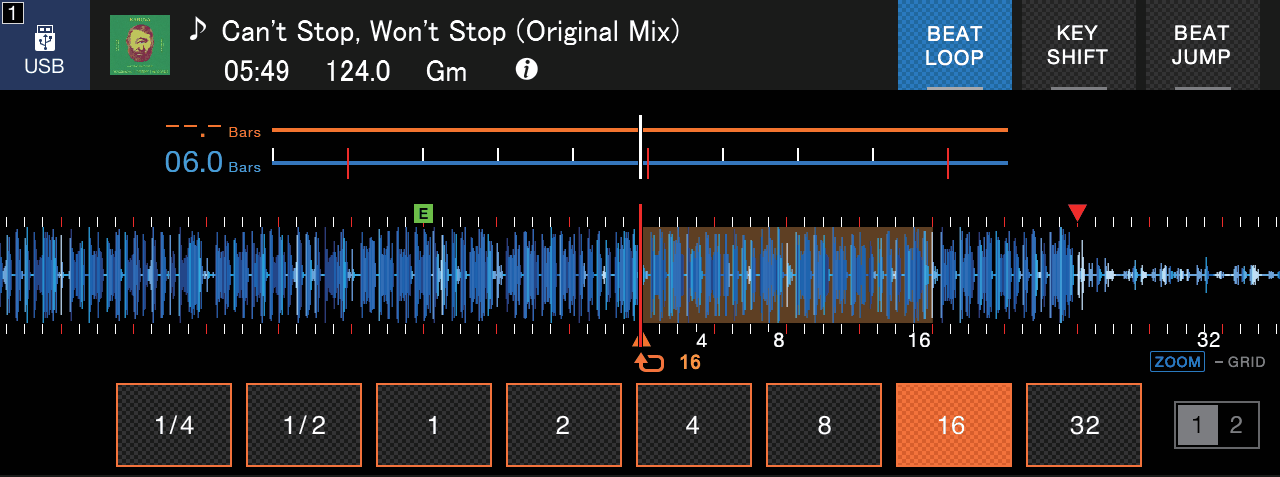
Beat loop lengths on the CDJ-3000 touchscreen.
Do this now
Before class 2: buy or gather twenty tracks in one genre at similar tempos, get every one of them on-grid and keyed, put them in a playlist, and export it to a FAT32 USB. Bring the stick.