Backing up rekordbox properly, keeping a library you can find things in, and drills that force good hand order.
Back up your library
A rekordbox library is years of grids, cues and playlists sitting in one database on one laptop. Laptops get stolen, dropped and updated into oblivion. Back it up this week and set a reminder for the first of every month.
- File > Library > Backup Library. Choose an external drive, and tick include music files unless you already back those up separately. The backup is a single file you can move anywhere.
- File > Library > Restore Library puts it back on a new machine. Test the restore once, on purpose, so the first time is not an emergency.
- Cloud Library Sync (rekordbox's own, or via Dropbox) keeps the library mirrored across two computers and up to date automatically. Worth it if you ever DJ from more than one laptop.
- Two USBs, always. The second stick is the backup that lives in a different pocket. Export the same playlists to both.
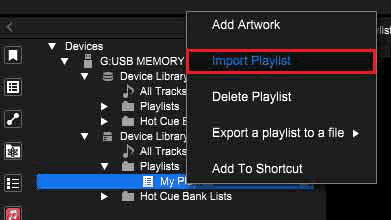
A USB is a backup too: cues, grids and playlists on the stick import straight back into a fresh library.
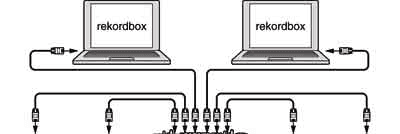
Two computers on one library: Cloud Library Sync, or a restored backup.
Keep a library you can find things in
- Missing files. Moved a folder? rekordbox shows the track with an exclamation mark. Fix them with File > Display All Missing Files > Relocate before they multiply.
- My Tag — your own tags, in four groups (genre, components, situation, and one of your own). *Peak-time*, *warm-up*, *vocal*, *closer* tell you more than a genre column ever will.
- Colour and rating for a fast filter on the player's screen: red for bangers, blue for openers, five stars for the ones that always work.
- Intelligent playlists build themselves from rules — every 124–128 BPM track in 8A or 9A rated four stars and up, say. Make one per situation you actually play.
- Collection Radar and the related-tracks list find the next record for you when you have run out of ideas mid-set.
Practice with one hand only
Mixing with one hand forces the right order of operations, because you cannot do two things at once. It also mirrors real booths, where the other hand is holding headphones, a drink, or the mixer down because the table wobbles.
- Right hand only. Cue, count, play, nudge, and bring the fader up. The left hand stays flat on the table.
- Left hand only on the mixer: EQ, trim and fader while the right hand does nothing at all. Notice how much of a mix is mixer, not deck.
- No headphones. Use the waveform, quantize and the phrase display to mix visually. It is not how you should play, but it is how you will one night when the headphone socket is broken.
- No sync, ever. Sync is a tool for people who can already beatmatch. Until then it hides what you cannot do.
Do this now
Back up the library and restore it to a second location. Then thirty minutes of one-handed mixing a day: fifteen deck-hand, fifteen mixer-hand.