The mixer's colour FX and beat FX one by one, what each is for, the dos and don'ts, and slip-mode tricks.
Colour FX
The SOUND COLOR FX knob on each channel is one effect, chosen for the whole mixer, applied per channel. Turn it left or right from the centre; the centre is off.
- FILTER — low-pass to the left, high-pass to the right. The one you will use every set: high-pass the outgoing track and it fades to air.
- DUB ECHO — a feedback echo that follows the beat. Turn it up as you pull the fader down and the track trails off.
- SWEEP — a gate to the left, a resonant filter to the right. Movement without changing the mix.
- NOISE — white noise, filtered by the knob. Build-ups.
- CRUSH — bit-crushing. Loud, rare, short.
- SPACE — reverb. Lovely on a vocal, deadly on a bassline.

The colour FX set, one knob per channel.
On the mixer the six buttons pick the effect for every channel at once, the COLOR knob on each channel applies it to that channel, and the PARAMETER knob under the buttons changes the effect's character — the resonance of the filter, the feedback of the echo. Set PARAMETER before the set, not during it.
Beat FX
The BEAT FX section is one effect at a time, on a channel you choose, timed to the beat in divisions you set. On the DJM-900NXS2:
- DELAY and ECHO — repeats; echo feeds back and fades. Set to 1/1 or 1/2 and use on the way out.
- PING PONG — echo alternating left and right.
- SPIRAL — echo that rises in pitch as it feeds back. A rocket, once a night.
- REVERB — a room. Small amounts, on vocals and breakdowns.
- TRANS — a gate that chops the sound in time. Rhythm from anything.
- FILTER, FLANGER, PHASER — movement, in increasing order of obviousness.
- PITCH — shifts the pitch up or down by semitones.
- ROLL and SLIP ROLL — loop the last beat-fraction and repeat it; slip roll changes the fraction as you move the knob. Stutter build-ups.
- VINYL BRAKE — the record slowing to a stop. An ending.
- HELIX — a rising loop that layers on itself. Use with the level knob low.
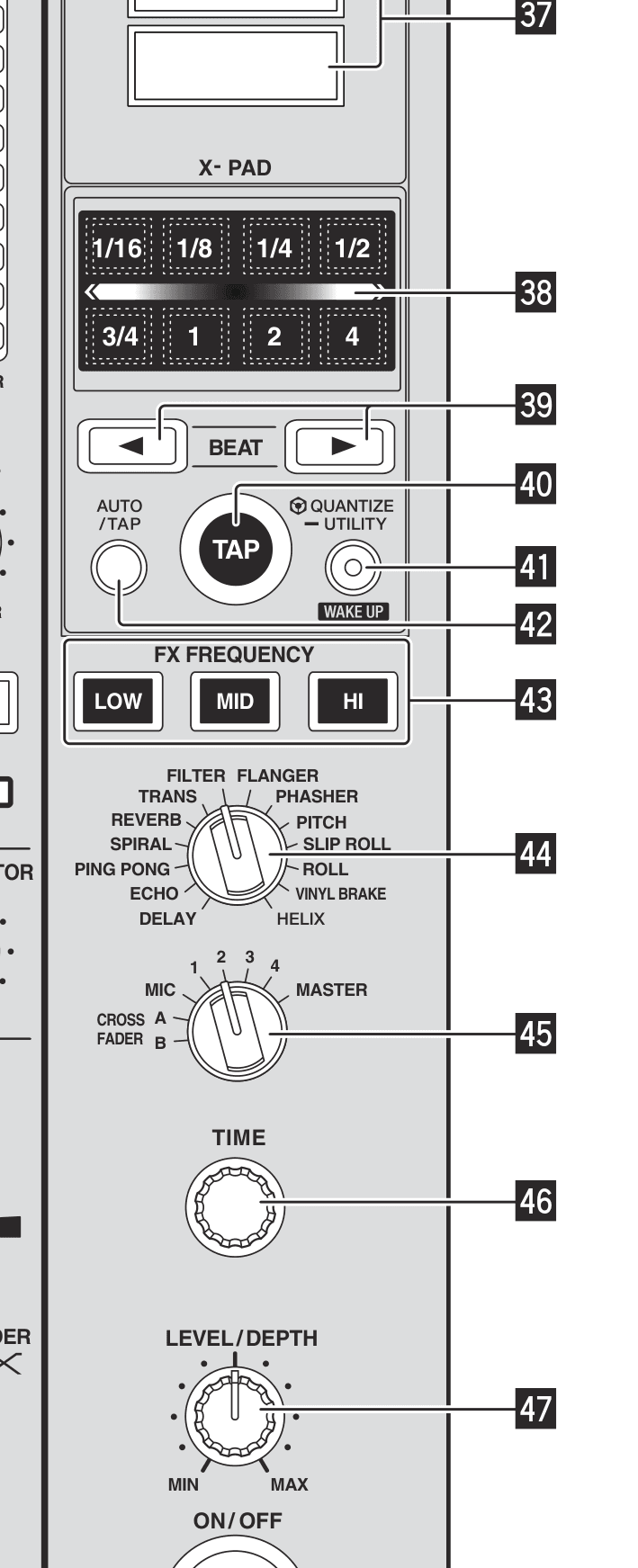
The BEAT FX section. Top to bottom: display, X-PAD, BEAT ◀ ▶, TAP and QUANTIZE, FX FREQUENCY, effect selector, channel selector, TIME, LEVEL/DEPTH, ON/OFF.
The order of operations, every time: choose the effect on the selector, choose what it goes on with the channel selector (1–4, MIC, crossfader A or B, or MASTER), set the beat fraction with BEAT ◀ ▶, keep QUANTIZE lit so it stays in time, and only then press ON/OFF — on a beat. LEVEL/DEPTH is how much; TIME is the fine control the beat buttons already set. FX FREQUENCY confines the effect to LOW, MID or HI, so an echo can hit the vocal without smearing the kick. The X-PAD is the same effect held on for as long as you touch it — for one-bar stabs it beats the button.
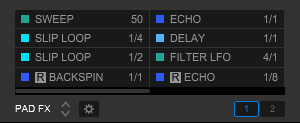
The same effects mapped to pads in rekordbox Performance mode — handy for practising the timing.
Tasteful applications
- Do use an effect to solve a problem: echo to end a track early, filter to make room, a roll to bridge a bar that does not line up.
- Do set the beat division before you switch the effect on, and switch it on on a beat.
- Do put the effect on the track that is leaving, not the one arriving.
- Don't leave an effect on for more than a phrase. If the crowd can name it, it has been on too long.
- Don't stack colour FX and beat FX on the same channel.
- Don't touch the effects in the first ten minutes of a set, or in someone else's.
Slip mode
SLIP keeps the track running silently underneath whatever you do to it, and drops you back in exactly where it would have been. So you can reverse, scratch, loop or hit a hot cue for a bar and nothing is lost.
- Slip reverse on the DIRECTION lever: a backwards bar that lands back on the beat.
- Slip loop: a one-beat loop for two bars of stutter, then release and the track carries on in time.
- Slip hot cue: tap the drop's hot cue on every beat for a bar, let go, and the track is still where it should be.
- Scratching in slip on the jog top in VINYL mode.
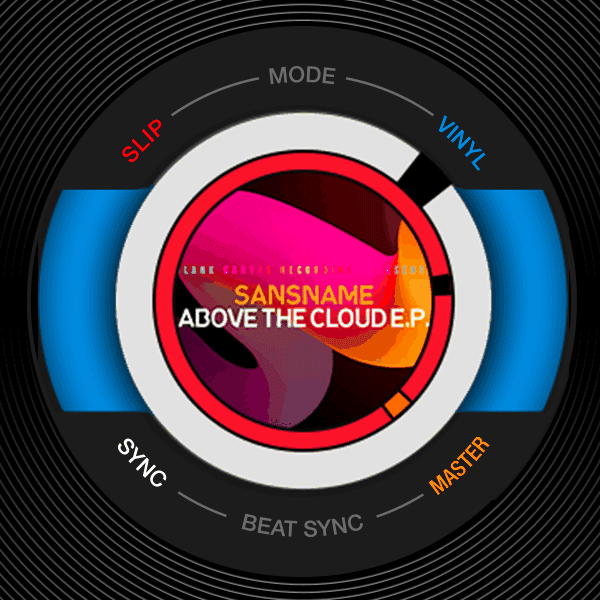
The jog display tells you what mode you are in. SLIP lit means the track keeps running underneath.
Do this now
Record ten minutes of mixing using exactly three effects, each once, each on the outgoing track. Then ten minutes using none. Listen to both and decide which one you would play in a club.