Hot cues, memory cues and active loops set in rekordbox; USBs that work on any player; trim and metering; quantize and master tempo.
Hot cues, memory cues and active loops
Three kinds of marker, three different jobs. Set them in rekordbox, not in the booth.
- Hot cues (A–H) are buttons. Press one and playback jumps there instantly, so they are for places you will *start from*: the first beat, the first kick after a breakdown, the drop, a vocal you want to bring in. Colour them consistently — one colour for intros, one for drops — and turn on Allow to auto load Hot Cue so the player loads them with the track.
- Memory cues are landmarks. They show on the waveform and you scroll to them with CUE/LOOP CALL. Use them to mark structure — every 16 or 32 bars, the breakdown, the outro — so you can see a track's shape at a glance.
- Active loops are memory loops that switch themselves on when playback reaches them. Put one at the end of a track with a short outro and it will never run out on you; put one over a bare drum section and you have a mix-in point of any length.
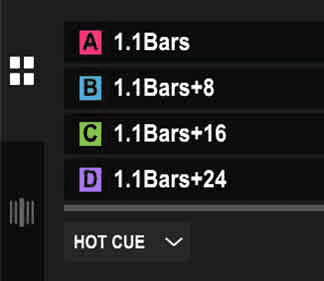
Hot cues named by bar. A, then eight bars later, then sixteen — a track you can navigate blind.
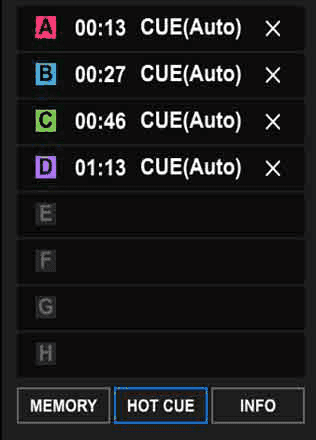
The cue list. Auto-set cues are a starting point; move them to where the music actually changes.

A saved loop on the waveform. Right-click it to make it active.
USB sticks that work everywhere
Players are fussy about drives. FAT32 is the format every Pioneer player since the CDJ-2000 will read; the CDJ-3000 also reads exFAT and HFS+, but the club may not have 3000s. Format to FAT32 unless you have a reason not to.
- Mac: Disk Utility > select the stick (the device, not the volume) > Erase > format MS-DOS (FAT), scheme Master Boot Record.
- Windows: the built-in formatter refuses FAT32 above 32 GB; use a third-party FAT32 formatter for bigger sticks.
- One partition. No encryption. A brand-name stick, not the free one from a conference.
Troubleshooting. A stick the player will not read is almost always one of: wrong format, a partition scheme other than MBR, pulled out mid-write, or exported from a newer rekordbox than the player's firmware understands (see class 11). Reformat and re-export before you assume it is broken.
Beatmatching, second pass
The reliable way to drop a track in: hold CUE so it plays from the cue point, count along with the playing track — *one, two, three, four* — and press PLAY on the next *one*. If you are a fraction out, nudge: a touch on the jog edge in the direction you need. Speed up if the incoming beat is late, slow down if it is early.
EQ and harmonic mixing, second pass
Same rules as class 1, faster: bass swap on a phrase, one bassline at a time, key codes within a step. This week you do it while counting.
Trim and the meters
Every track is mastered at a different level. The TRIM knob on each channel makes them equal before they reach the faders, and the channel level indicator — the meter beside the EQ, which reads the level *before* the fader — is how you set it: the peaks should sit around 0 dB, touching the orange, never living in the red, and the CLIP light above the trim should never come on. Adjust trim whenever a track comes in quieter or louder than the last — that is the knob for it. Do not compensate with the channel fader (you lose the throw) or the master (you distort the room).
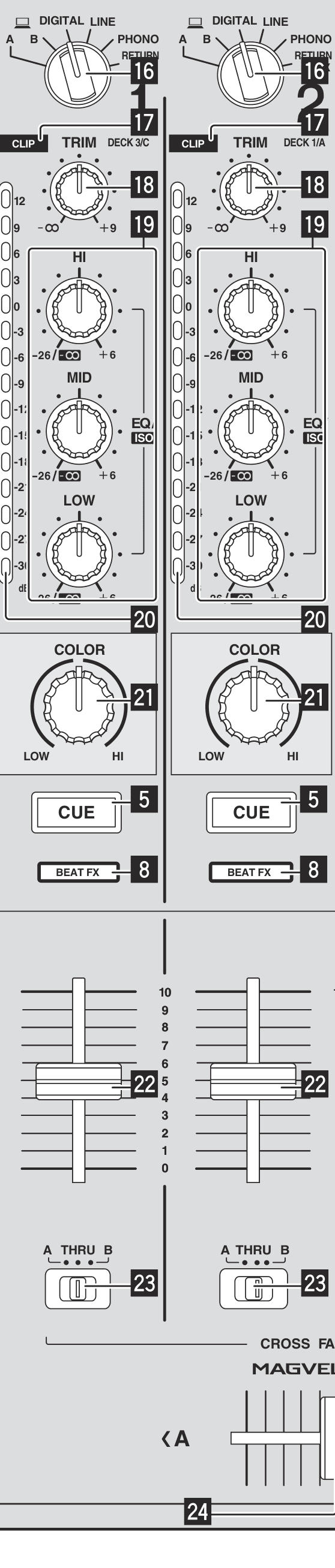
One channel, top to bottom: selector, CLIP and TRIM, the pre-fader meter, EQ, COLOR, CUE, fader. Every channel is this strip.
Monitoring in headphones
- Headphones into PHONES. Press CUE on the channel you want to hear — it lights, and pressing it again cancels it.
- MIXING blends what is in your ears: fully left is only the cued channel, fully right is only the master. Sit it around the middle so you hear the incoming track against what the room is hearing.
- MONO SPLIT puts the cue in one ear and the master in the other, which some people find easier for beatmatching. STEREO is the normal setting.
- LEVEL under HEADPHONES is your volume, and only yours. It does not affect the room, so set it where you can hear detail without hurting yourself over three hours.
Quantize and Master Tempo
QUANTIZE snaps everything you do — hot cues, loops, cue points — to the beat grid. With a good grid, on. With a bad one, it makes your timing worse, which is why you fixed the grids in class 1.
MASTER TEMPO keeps a track in its original key when you move the tempo slider. Within about ±6% it is inaudible; push further and the stretching starts to warble, especially on vocals. Leave it on for normal mixing, and turn it off when you *want* the pitch to move — vinyl-style slowdowns, or a deliberate key change.
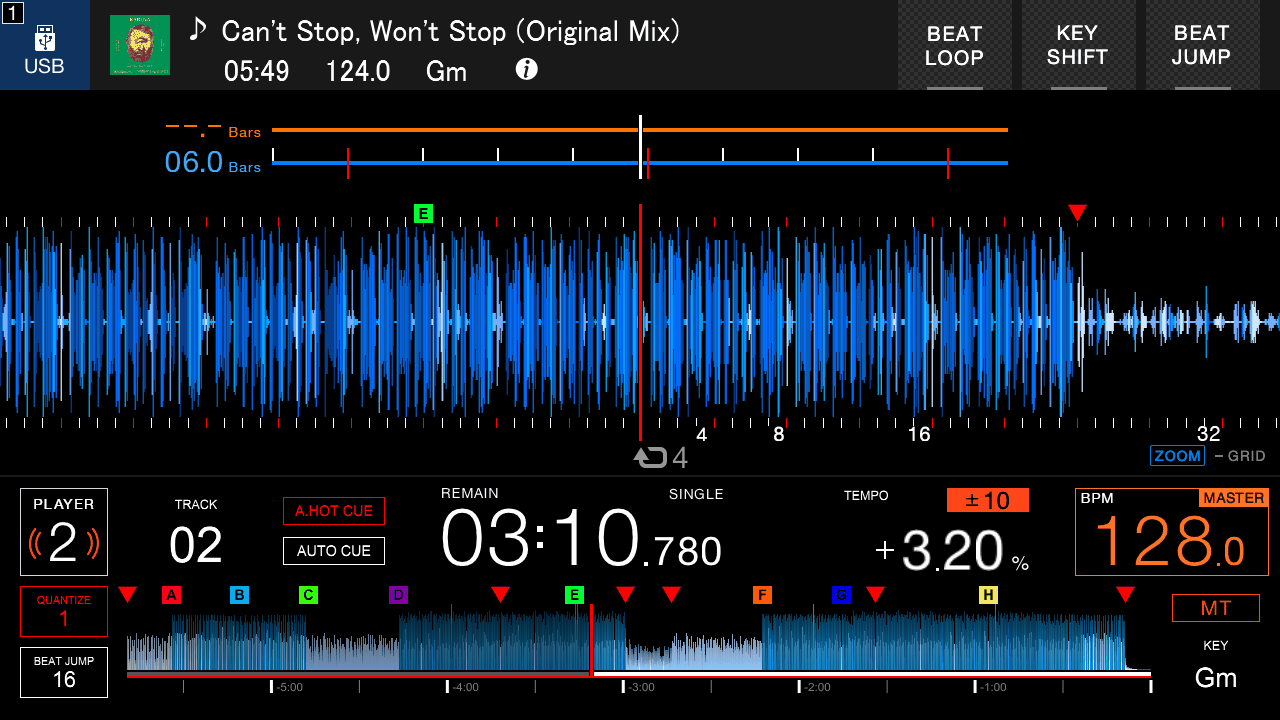
MT lit, tempo at +3.20%: the track is faster and still in key.
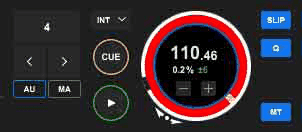
The same three controls in rekordbox: tempo range, Q, MT.
Do this now
Set hot cues A–D and memory cues at every phrase on ten tracks. Then mix them in pairs using cue-and-count only, no sync, and keep the channel meters out of the red for the whole session.