How a booth is wired; beatmatching with the screens covered; phrases in the waveform, and where a mix goes in and out.
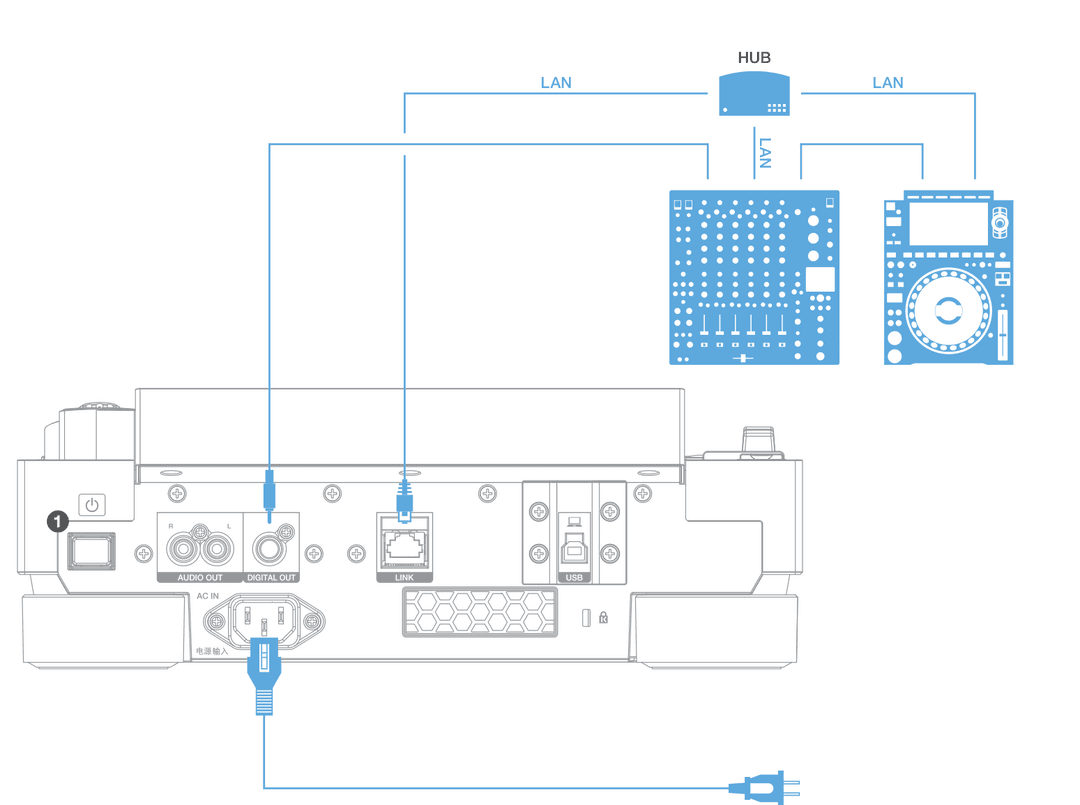
How everything plugs in
You will arrive at booths where something is unplugged. Knowing the wiring is the difference between a two-minute fix and a night with one working deck.
- Power to each player and the mixer, and the mixer on *last*, so nothing thumps the speakers.
- Each player's AUDIO OUT (RCA) to a mixer channel's LINE input, or its DIGITAL OUT to the channel's DIGITAL IN if the mixer has one. Then set that channel's input selector on the top panel to match — LINE or DIGITAL, not PHONO. A turntable goes to PHONO, with its earth wire on SIGNAL GND.
- LINK: an Ethernet cable from each player to a hub, or from one player straight to another if there are only two. This is PRO DJ LINK — one USB stick then feeds every player, and the beat sync and waveform sharing work across them.
- Mixer MASTER OUT to the house system, BOOTH OUT to the monitors, headphones into the front.
- Your USB into one player. Under SOURCE on any linked player you will see it listed.
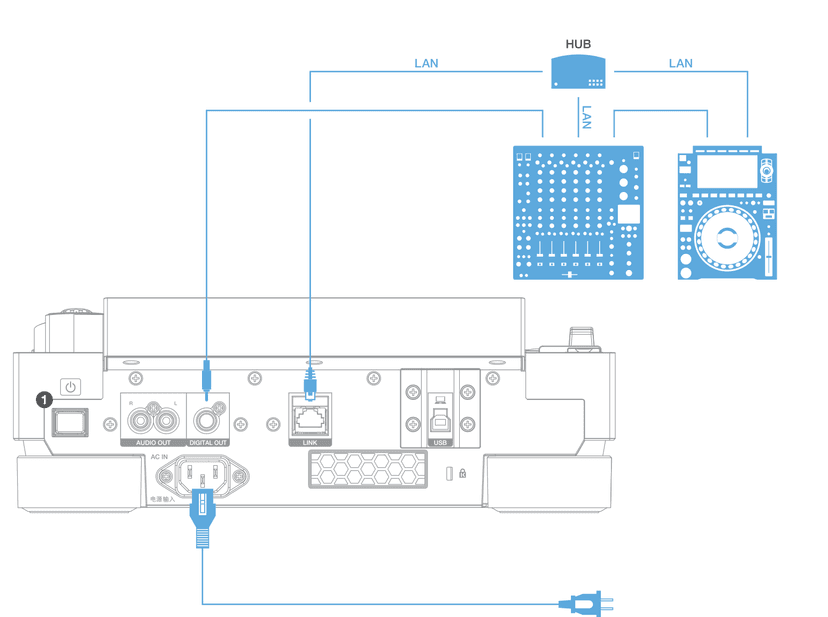
Rear panel and LINK wiring. Audio to the mixer, LAN to the hub, power last.
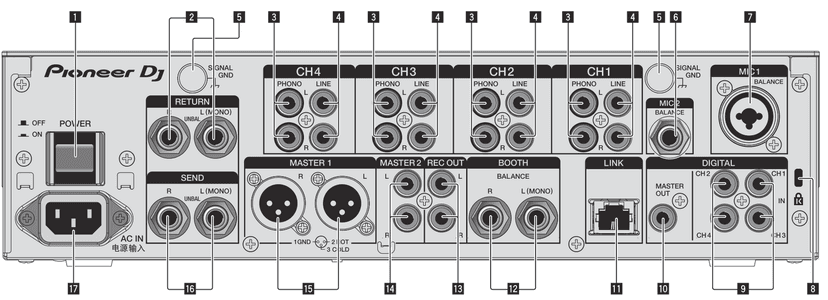
DJM-900NXS2 rear panel. What plugs in where:
- 4 — LINE — a player's AUDIO OUT, one pair per channel
- 9 — DIGITAL IN — a player's DIGITAL OUT instead, one per channel
- 3, 5 — PHONO and SIGNAL GND — turntables only. Leave the shorting plugs in when nothing is connected
- 11 — LINK — LAN to the players' LINK ports, via a hub
- 15 — MASTER1 (balanced XLR) — to the house system. MASTER2 (RCA) is the unbalanced spare
- 12 — BOOTH — the booth monitors
- 13 — REC OUT — for a recorder or interface (class 8)
- 10 — DIGITAL MASTER OUT — the master as S/PDIF
- 2, 16 — RETURN and SEND — an external effects unit
- 6, 7 — MIC2 and MIC1
- 1, 17 — POWER, and AC IN — connect the power cord last
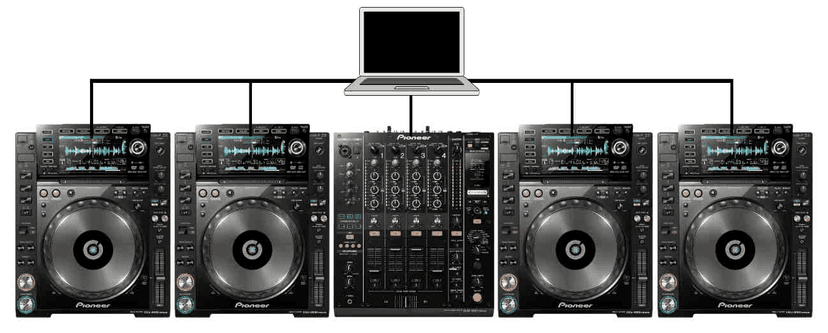
A four-player booth. Each player is a channel; the LAN ties them together.
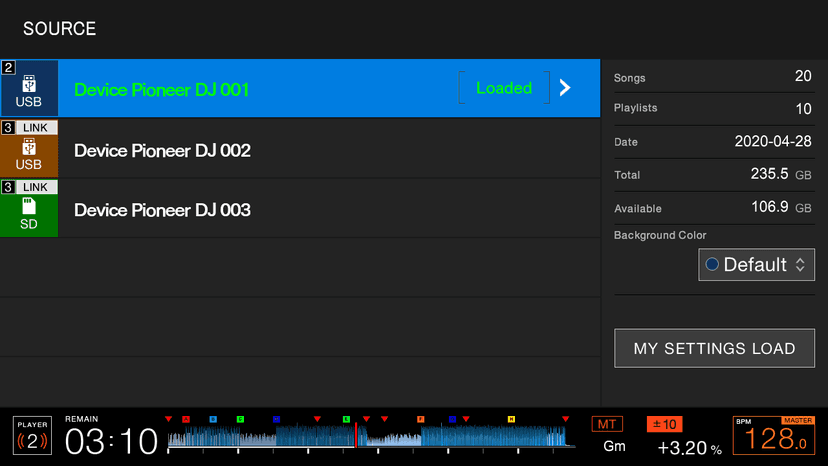
SOURCE: your USB, and the sticks in the other players over LINK.
Ear training: screens covered
The waveform will not always be there — older players, controllers, a screen that has died. This week the screens are covered and the tempo readout hidden.
- Listen for the flam: two kicks slightly apart sound like a galloping *d-dum*. That is drift.
- Decide which way. If the incoming kick lands after the playing one, it is late: speed up. If before, slow down. Say it out loud until it is automatic.
- Nudge, then fix. The jog corrects the position; only the tempo slider corrects the speed. If you keep nudging the same way, move the slider.
- Count phrases with the music. If you lose count, you mix on the wrong bar, and that is a bigger error than a drifting beat.
Phrasing
Bars come in groups. 4 bars is a phrase, 8 is the usual unit of change, 16 and 32 are where sections start and end. rekordbox's phrase analysis labels them — INTRO, VERSE, BUILD, CHORUS (the drop), OUTRO — and the waveform shows you the rest: the intro is thin, the drop is the loud block, the breakdown is the gap.
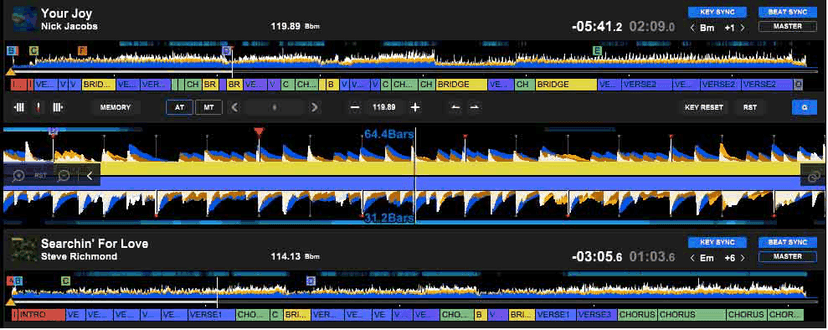
Phrase analysis on two decks: the coloured bar under each waveform is the structure.

The intro, sixteen bars of drums before anything else arrives. That is your mix-in window.
Where to mix in and out
- Start the incoming track's intro on the *first beat of a phrase* of the playing track — ideally at the start of a 16- or 32-bar section.
- Bring it in over 16 bars: fader up, LOW cut. Swap the bass when both tracks are in drum-only sections.
- Take the outgoing track out before its breakdown or on its outro. Two breakdowns at once is silence; a breakdown under a drop is a mess.
- If the phrases do not line up, a loop on the outgoing track buys the bars you need.
Do this now
One hour a day with a towel over the screen. Ten mixes, no waveform, no BPM readout. Note which way you had to correct and how long it took; by class 4 it should be under a phrase.