Load Wavetable, click the wavetable name in Oscillator 1, and start scrolling through the list while a note is held. That is the whole chapter — everything below is the map that makes the scrolling less random.
What a wavetable actually is
Analog gives you five waveforms. Wavetable gives you two oscillators, and each one holds a wavetable: one sample containing dozens of single-cycle waveforms lined up in a row, arranged so that moving between them changes the tone gradually instead of jumping.
That movement is the Position control, and it is the whole reason wavetable synthesis sounds the way it does. A static position is just a waveform. A position that moves — by envelope, by LFO, by mod wheel — is the sound people buy wavetable synths for.
The categories
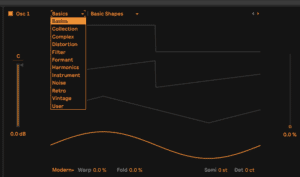
The pulldown inside each oscillator sorts everything Ableton ships into categories. They are worth knowing by character, not by name:
- Basics — the classic analogue shapes and gentle morphs between them. Start here when you want something that behaves.
- Collection — a grab bag of the strongest tables from everywhere else. Good for browsing when you do not know what you want.
- Complex — dense, harmonically busy tables. Immediately interesting, harder to sit in a mix.
- Distortion — tables that are already dirty before you touch a filter.
- Filter — tables that sweep as though something is filtering them. Movement built into the table itself.
- Formant — vowel-like. Vocal textures without a vocoder.
- Harmonics — built from harmonic series, so they stay musical however far you push Position.
- Instrument — sampled-ish approximations of real instruments. Useful as a layer, rarely convincing alone.
- Noise — pitched and unpitched noise. Percussion, texture, risers.
- Retro and Vintage — early digital and early analogue character, aliasing and all.
- User — anything you drop in yourself.
Do this now
- Load Wavetable and hold a low note.
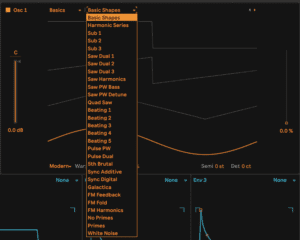
- Set Oscillator 1 to Basics and sweep Position by hand. Listen to how gradual it is.
- Switch to Complex and do the same. Same control, completely different journey.
- Now go to the Modulation Matrix, assign Envelope 2 to Osc 1 Position, and turn the amount to 100%. Play a note. The tone now moves on its own every time you hit a key.
- Slow the envelope's attack right down. That is a pad. Speed it up to nothing and add decay. That is a pluck.
One table, two envelope settings, two completely different instruments. That is the point of the category list — it is a starting position, not a preset.