Multiple Filters with Different Routings, Nested Modulation, Looped Envelopes, and Unison Modes
It is common to use multiple filters with different routings to shape the sound. The filters can be placed in series or in parallel, or a combination of both, to achieve a variety of tonal effects. Here are some examples of different filter routings:
- Series: In this routing, the sound passes through multiple filters in series. The output of the first filter is fed into the input of the second filter, and so on. This allows for a more drastic tonal shaping, as each filter will have a significant impact on the sound.
- Parallel: In this routing, the sound is split into multiple paths, each of which passes through its own filter. The outputs of each filter are then mixed together. This allows for a more subtle tonal shaping, as each filter will have less of an impact on the overall sound.
- Split: In this routing, the sound is split into two or more frequency bands using a crossover filter. Each frequency band is then passed through its own filter, and the outputs are mixed back together. This allows for more precise tonal shaping, as different filters can be applied to different frequency ranges.
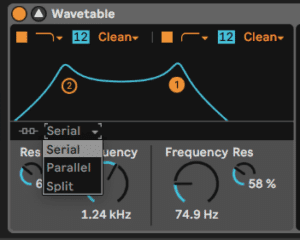
The oscillator effects of FM, pulse width/sync, and phase distortion can also be combined with multiple filters to create complex and unique sounds. The Fold and Warp parameters can be used to further shape the waveform and add harmonics to the sound.
Nested modulation refers to the technique of using one modulation source to modulate another modulation source, which is then used to modulate a parameter in a synthesizer. In wavetable synthesis, this technique can be used to create complex and evolving sounds by modulating multiple parameters simultaneously.
For example, an LFO can be used to modulate the rate of another LFO, which is then used to modulate the wavetable position of an oscillator. This can create complex and evolving timbres that change over time.
Another example is using an envelope to modulate the amount of modulation applied by an LFO, which is then used to modulate the filter cutoff frequency. This can create dynamic filter sweeps that change in response to the envelope and LFO modulation.
The possibilities for nested modulation are virtually endless and can lead to very unique and interesting sounds. However, it is important to experiment and carefully adjust the modulation amounts to avoid creating chaotic and unmusical results.
Looped envelopes are a type of modulation envelope that continuously cycles through its stages, creating a repeating pattern of modulation. In synthesis, looped envelopes can be used to create repeating patterns of modulation. Wavetable has 3 envelope modes:
Envelope 1 in the image below will loop the volume: Loop will loop the entire envelope without holding the sustain. Adjust the attack, decay or release to adjust the loop length. Trigger is playing through all the envelope stages from beginning to end without having to hold the note. None is a normal ADSR holding the sustain as the key remains pressed.
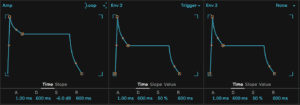
For example, a looped envelope can be used to modulate the filter cutoff frequency in a synth patch, creating a rhythmic pattern. This can add movement to the sound, making it less static. Note that unlike with an LFO, in Wavetable we can not sync the envelope to your song’s tempo. Other software synthesizers have built-in looped envelopes, which can be synced to the tempo of the song or loop. These envelopes can often be edited by adding additional breakpoints that can be quantized to the grid.
Of course we can also modulate other parameters such as oscillator pitch, wavetable position, and effects parameters. By carefully adjusting the envelope settings, it is possible to create complex and evolving sounds that evolve over time.
Unison modes enhance the sound by creating a thicker, wider, and more complex texture. The Unison modes in Wavetable synthesis are:
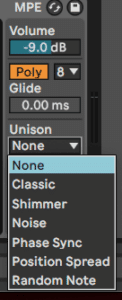
The Poly/Mono toggle switches the instrument between a single voice with legato envelopes (Mono) and a polyphonic instrument (Poly).
The Poly Voices drop-down menu lets you set the maximum number of notes that can sound simultaneously. Note that Poly Voices is only active when the Poly/Mono switch is set to Poly.
Glide adjusts the time overlapping notes take to slide their pitch to the next incoming pitch. Note that Glide is only active when the Poly/Mono switch is set to Mono.
- Classic: the oscillators are detuned with equal spacing and panned to alternating stereo channels.
- Shimmer: the oscillator pitches are jittered at random intervals, giving a shimmering reverb-like effect. A small amount of wavetable offset is also applied for extra fullness.
- Noise: pitches are jittered as in the Shimmer unison mode, but at a much faster rate, resulting in noisy breathy textures. A small amount of wavetable offset is applied for extra fullness.
- Phase Sync: the oscillators are detuned as in Classic unison mode, but the phases are synced when a note is started giving a strong sweeping phaser-style effect.
- Position spread: the wavetable positions for each oscillator are evenly spread out by an amount. A small amount of detune is additionally applied for extra width.
- Random note: the wavetable positions and detune amount for each oscillator are randomised each time a note is started.
The Voices slider sets the number of simultaneously running oscillators per wavetable oscillator. More voices will result in a thicker sound, whereas less voices will sound clearer.
The Amount slider adjusts the intensity of the unison effect, and has different behavior in each unison mode. Note that this is a multiplicative modulation destination.
Do this now
- Set Wavetable's two filters to Serial and put a low-pass after a high-pass.
- Switch the routing to Parallel and hear the difference on the same settings.
- Now use Split and give each frequency band its own filter type.
Serial narrows, parallel blends, split treats ranges separately. Three very different sounds from one patch.