Most effects work on the waveform. These two break the sound into its frequency components first, process those, and put it back together — which lets them do things no filter or delay can.
Spectral Resonator
It takes the incoming sound apart and rebuilds it out of resonances tuned to a note. Feed it a drum loop and the drum loop becomes pitched, while still being recognisably a drum loop.
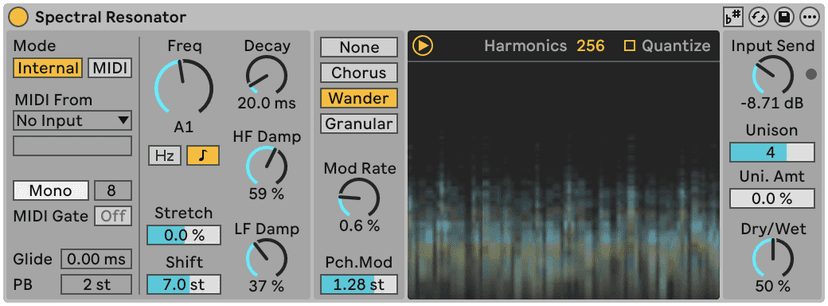
- Pitch mode sets what it tunes to — a fixed note, MIDI input, or the incoming signal's own pitch.
- Set it to MIDI and put it on a return, and you can play a drum loop like an instrument from your keyboard.
- Frequency and Harmony control the resonator bank's spacing. Harmonic spacing sounds like a note; inharmonic spacing sounds like a bell or a sheet of metal.
- Decay is how long the resonances ring. Short is a tonal colouring; long is a pad made out of whatever you fed it.
- Mix matters more here than on most effects — a small amount of Spectral Resonator under a dry signal is a very usable sound, and 100% wet is an effect.
Spectral Time
Two processors in one device, and they are both about time.
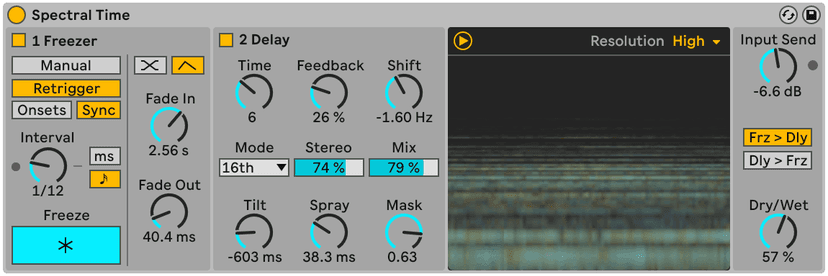
The Freezer grabs the current spectrum and holds it indefinitely — an infinite sustain of one moment. Not a reverb tail; the actual harmonic content, frozen. Trigger it on a chord and it holds until you tell it not to.
The Delay section is a frequency-domain delay: different frequency bands are delayed by different amounts, so a sound smears rather than repeats. The Tilt control decides whether the highs or the lows arrive late.
Together they give you the long, drifting, unplaceable textures that would otherwise take a granular synth and a lot of patience.
Do this now
- Put Spectral Resonator on a drum loop. Pitch mode to MIDI, Mix to 100%.
- Route a MIDI track to it and play a chord. The drums are now the chord.
- Pull Mix back to about 35%. Now it is a drum loop with a tonal shimmer on it — far more usable.
- Add Spectral Time after it. Freeze on a downbeat and let it hang.
- Set the Delay section's Tilt so the high frequencies arrive late, and play the loop again.
These two are CPU-hungry and worth it. Freeze what you make and move on.