Recording one note and pitching it across the keyboard gives you the chipmunk problem: pitch a sample up a fifth and it plays faster, so a piano turns into a toy. A multisample fixes it by using different recordings for different parts of the range.
How many samples
Every third semitone is broadly transparent. Every fifth is fine for most things. Every octave is audibly wrong on anything with a strong character.
Start with minor thirds — four samples per octave. For a three-octave instrument that is twelve recordings, which is an afternoon rather than a week, and it will sound convincing.
Building it
- Record your notes. Name them so the note is in the filename — Sampler reads the pitch from the name and places them for you.
- Drag them all into Sampler at once.
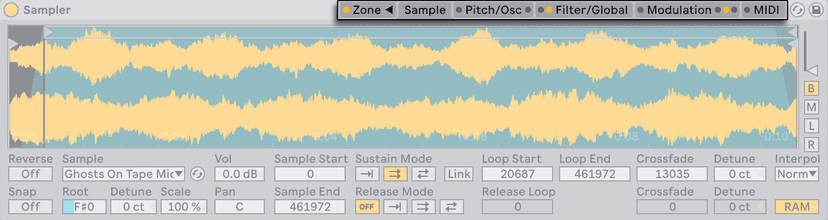
- Open the Zone tab, Key view. Each sample has a key range. Use Distribute Ranges Equally and then adjust.
- Set the root key for each sample if the filename did not do it.
- Add crossfades at the zone edges so the switch between samples is not audible.
Velocity layers
The second dimension. Record each note soft, medium and hard, and put them in velocity zones. A hard piano note is not a loud soft note — it is a brighter, different sound, and this is the only way to capture that.
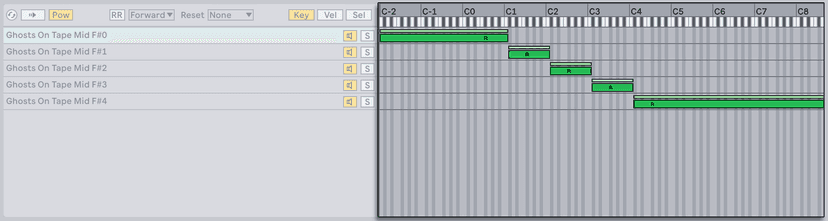
Three layers is the usual compromise. Crossfade the edges or you will hear the switch on a crescendo.
Round-robin
Record the same note two or three times and alternate between them, so a repeated note is not identical each time. Sampler does not have a dedicated round-robin control, so build it with chain select zones in an Instrument Rack, randomised — or accept that most listeners will not notice on anything but drums.
Importing other people's libraries
Sampler imports several third-party multisample formats directly. Drag the instrument file into the browser and Sampler will map the zones as the original intended, which saves an enormous amount of work compared to importing raw samples.
Do this now
Record one note of something around you — a mug, a door, a guitar string — at four pitches, an octave apart is fine to start. Load them into Sampler, distribute the ranges, set the root keys, add crossfades. Play a chord. You have made an instrument nobody else has.