Tension
Tension
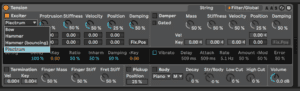
Tension is a physical modeling synthesis instrument in Ableton Live that is specifically designed to create realistic string and plucked instrument sounds. It uses mathematical models to simulate the physics of how strings vibrate, resonate, and interact with each other and with the body of the instrument.
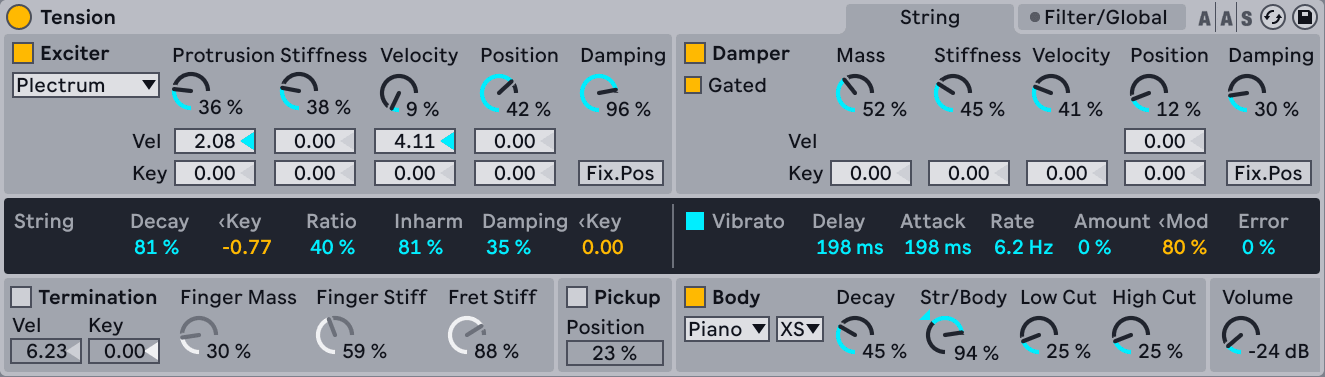
The labelling of the controls in Tension is descriptive of the variables that control the sound of different string instruments.
To create a string sound in Tension, you start by selecting the Exciter type for instrument you want to model.
It is the vibration from the string which constitutes the main sound production mechanism of the instrument. The string is set into motion by the action of an exciter which can be a hammer, a pick or a bow. The frequency of the oscillation is determined by the effective length of the string, which is controlled by the finger/fret interaction or termination. A damper can be applied to the strings in order to reduce the decay time of the oscillation. This is the case on a piano, for example, when felt is applied to the strings by releasing the keys and sustain pedal. The vibration from the string is then transmitted to the body of the instrument, which can radiate sound efficiently.
Exciter Types
Bow — this exciter is associated with bowed instruments such as the violin, viola or cello. The bow sets the string in sustained oscillation. The motion of the bow hair across the string creates friction, causing the string to alternate between sticking to the hair and breaking free. The frequency of this alternation between sticking and slipping determines the fundamental pitch. Note that the Damping knob is unavailable when the Bow exciter is selected.
Hammer — this exciter type simulates the behavior of soft hammers or mallets. Hammer models a hammer that is located below the string and strikes it once before falling away. This type of mechanism is found in a piano, for example.
Hammer (bouncing) – this exciter type is similar to Hammer, except that it models a hammer that is located above the string and is dropped onto it, meaning that it can bounce on the string multiple times. This playing mode can be found on a hammered dulcimer, for example.
Plectrum — a plectrum or “pick“ is associated with instruments such as guitars and harpsichords. It can be thought of as an angled object placed under the string that snaps the string into motion.
Exciter parameters vary depending on exciter type!
Damping section dampens the resonating string. Dampers create a sound on their own typical for the instrument character.
String section
The vibration of the string is the main component of a stringed instrument’s sound. The effective length of the string is also responsible for the pitch of the sound we hear.
The Decay slider determines how long it takes for the resonating string to decay to silence. Higher values increase the decay time. The < Key slider next to Decay allows decay time to be modulated by note pitch.
The Ratio slider sets the ratio of the decay time of the string’s oscillation during note onset and release. At 0%, the time set by the Decay slider sets the decay time for both the onset and release of the note. As you increase the Ratio, the release time decreases but the onset decay time stays the same.
The theoretical model of a resonating string is harmonic, meaning that the string’s partials are all exact multiples of the fundamental frequency. Real-world strings, however, are all more or less inharmonic, and this increases with the width of the string. The Inharm slider models this behavior, causing upper partials to become increasingly out of tune as its value increases.
The Damping slider adjusts the amount of high frequency content in the string’s vibration. Higher values result in more upper partials (less damping). This parameter can be modulated by note pitch via the < Key slider to its right.
Vibrato
This section uses an LFO to modulate the string’s pitch. As with all of Tension’s parameters, the controls in this section can be used to enhance the realism of a stringed instrument model — or to create something never heard before.
The Vibrato section can be toggled on or off via the switch next to its name.
The Delay slider sets how long it will take for the vibrato to start after the note begins, while Attack sets how long it takes for the vibrato to reach full intensity (as set by the Amount knob).
The two most important parameters in this section are the Rate and Amount sliders. Rate adjusts the frequency of the pitch variation, while Amount adjusts the intensity (amplitude) of the effect.
The < Mod slider adjusts how much the modulation wheel will affect the vibrato intensity. This control is relative to the value set by the Amount knob.
The Error slider introduces unpredictability into the vibrato, by introducing random deviation to the Rate, Amount, Delay and Attack parameters.
Termination
This models the interaction between the fret, finger and string.
Pick Up
Use this for electric guitar sounds
Body
This is the resonator!
To create a plucked instrument sound, such as a guitar or harp, you can use the Excitator section to model the plucking or striking of the strings. The Excitator allows you to select different types of plucking or striking sounds, such as a pick or a finger, and adjust parameters such as force, stiffness, and damping to shape the sound.
In addition to string and plucked instrument sounds, Tension can also be used to create realistic key and percussion sounds. By adjusting the parameters of the hammer, damper, and body sections, you can create the sound of a piano or other keyboard instrument. Tension also includes a wide range of presets that you can use as starting points for creating your own sounds.
In the Damper’s String section we find many ways to fine tune the damper’s action.
Under Filter/Global we find more conventional synthesis tools such as filter types and modulators, as well as some conventional global controls that we already know from other synthesizers.
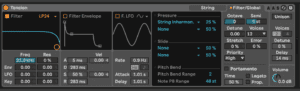
You can then adjust parameters such as tension, damping, and stiffness to shape the sound of the string. You can also add additional strings to create a chord or layered sound.
In addition to string and plucked instrument sounds, Tension can also be used to create realistic key and percussion sounds. By adjusting the parameters of the hammer, damper, and body sections, you can create the sound of a piano or other keyboard instrument. Tension also includes a wide range of presets that you can use as starting points for creating your own sounds.
Do this now
- Load Tension and cycle the exciter between bow, hammer and pluck on the same string settings.
- Change the termination and the pick up position and listen to the tone move.
- Add vibrato from the LFO rather than from your controller.
The exciter and the pickup position do more for realism than any amount of EQ.