You can build a physical modelling synth out of two devices you already have, in about a minute, and it will teach you more than a page of theory.
Build a string out of noise and a delay
- Put Simpler on a MIDI track with a very short percussive sample — a rimshot works, so does a burst of noise from Analog with a fast attack and near-instant decay.
- Put Echo after it.
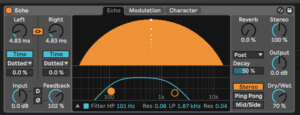
- In Echo, set the delay time to something tiny: 3 to 10 ms. Anything longer and you hear a delay instead of a note.
- Turn the feedback up towards 100%. Carefully — turn your monitors down first, this can get loud fast.
- Set Echo's filter to a low-pass around 1–2 kHz.
Play a note. That short click is now a sustained, pitched tone — and the pitch is set by the delay time, not by the sample. Nudge the delay time and the note changes. If you routed a keyboard to that delay time you would have a playable string instrument.
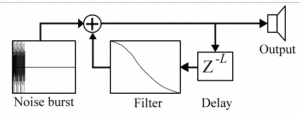
That is Karplus-Strong, and it is the seed of every physical modelling instrument in Live. An exciter — the click — starts the thing vibrating. A resonator — the delay with feedback — decides what it sounds like and how long it rings. The filter in the loop is why the tone dulls as it decays, the same way a real string loses its high harmonics first.
Why this matters
A sampler plays a recording of a guitar. A physical model calculates what a guitar-shaped object would do if you hit it — so you can change the shape. String length, body density, where you strike it, what you strike it with: all controls, all playable in real time.
And because it is a model rather than a recording, you can give it values no real object could have. A string ten metres long. A drum head made of glass. This is where physical modelling stops being an imitation of acoustic instruments and starts being its own thing.
The catch is in the feedback loop: a system built on delay lines with feedback can and will run away from you. If a patch suddenly gets loud, that is what happened. Keep a Limiter on the master while you experiment.
Keep going
- Change the exciter. Same Echo settings, but feed it a hi-hat, a vocal syllable, a snap. The resonator is the same; the instrument is completely different.
- Sweep the low-pass in the feedback loop while a note rings. That is the difference between a nylon string and a steel one.
- Raise the resonance slowly as you go.
- Shape the whole thing with an amp envelope — decay and release are what make it a pluck rather than a drone.
Once this makes sense, Collision, Tension and Corpus are the same idea built properly: an exciter, a resonator, and controls over the physical object in between. You will recognise every one of them.