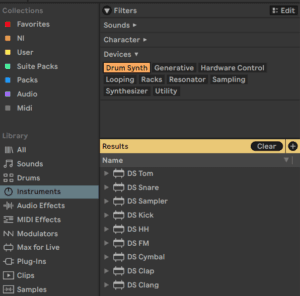
These eight devices all work the same way. To hear one with its current settings, click anywhere in the upper display area — no MIDI needed. Each is a single drum voice built from synthesis rather than samples, so every part of the sound is a control you can automate.
M4L Drum Synths
DS Clang
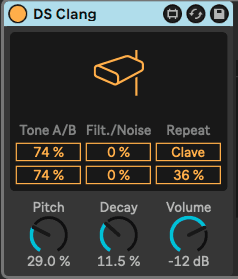
The DS Clang Instrument.
DS Clang consists of two separate tones, white noise and a filter, allowing you to create a variety of cowbell, clave and noise percussion sounds.
The Tone A/B sliders let you set the volume for each cowbell tone independently.
The Filter control sets the high-pass and band-pass filter cutoff, allowing you to change the color of the sound. At higher values, the signal has more high-frequency content.
The Noise slider allows you to set the amount of white noise applied to the signal.
When the Clave switch is activated, you can add repeats to the clave sound using the Repeat slider.
You can use the Pitch parameter to change the pitch of the instrument. The Decay knob sets the length of the sound, while the Volume control adjusts the overall level of the instrument.
To preview the sound of the instrument with its current settings, click anywhere in the upper half of the display.
DS Clap
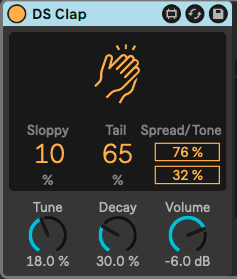
The DS Clap Instrument.
DS Clap is a mix of filtered noise and an impulse running through panned delay lines, that allows you to create a range of sounds from a tight electronic clap to a more organic, humanized handclap.
The Sloppy control adjusts the delay time between the two delay lines, so you can set how tightly or loose the panned claps play together. Tail adds filtered noise to the impulse of the clap.
The Spread slider sets the stereo width of the clap. 0% yields a mono signal while 100% creates a widened stereo image. The Tone slider adjusts the color of the clap. At higher values, the signal has more high-frequency content.
You can use the Tune parameter to change the pitch of the clap. The Decay knob sets the length of the clap, while the Volume control adjusts the overall level of the instrument.
DS Cymbal
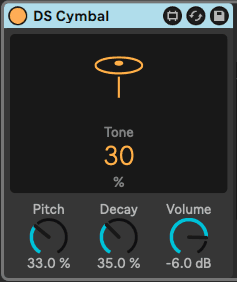
The DS Cymbal Instrument.
DS Cymbal combines sine and pulse waveforms with high-passed noise, making it possible to recreate a variety of timbres, from a thin ride cymbal to a heavy crash.
The Tone slider in the display sets the high-pass filter cutoff, allowing you to change the color of the cymbal. At higher values, the signal has more high-frequency content.
You can use the Pitch parameter to change the pitch of the cymbal. The Decay knob sets the length of the cymbal, while the Volume control adjusts the overall level of the instrument.
DS FM
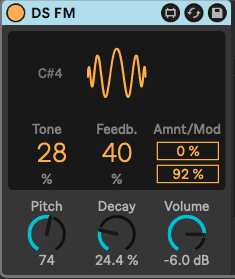
The DS FM Instrument.
Inspired by a classic Japanese FM synthesizer, DS FM lets you create a variety of effects, from static bursts to metallic lasers.
The Tone slider in the display sets the low-pass filter cutoff, allowing you to change the color of the drum. At higher values, the signal has more high-frequency content.
Feedb. adjusts the amount of feedback applied to the FM algorithm. Greater values yield more noise.
Amnt sets the amount of FM modulation, while the Mod slider blends between different modulation types.
The Pitch parameter provides global pitch control. The Decay knob sets the length of the drum, while the Volume control adjusts the overall level of the instrument.
DS HH
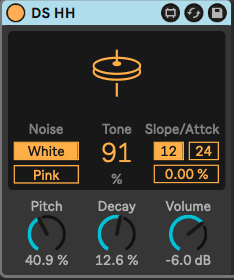
The DS HH Instrument.
DS HH is a blend of noise and sine waveforms, with which you can produce an number of sounds, from sharp closed hats to sizzling open hats.
The Noise toggle lets you choose between two noise types: white or pink.
The Tone slider in the display sets the high-pass filter cutoff, allowing you to change the color of the hat. At higher values, the signal has more high-frequency content.
The pitched portion of the sound is filtered through a resonant high-pass filter. The filter can be switched between 12 and 24 dB slopes, and the attack time can be set via the Attack slider.
You can use the Pitch parameter for global pitch control. The Decay knob sets the length of the hat, while the Volume control adjusts the overall level of the instrument.
DS Kick
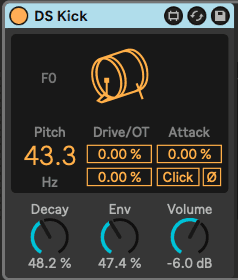
The DS Kick Instrument.
DS Kick is a kick drum synth with a modulated sine wave.
The Pitch slider lets you tune the kick in Hz. You can shape the kick sound by adding distortion via the Drive slider, or adding harmonics using the OT slider.
The Attack parameter smooths the sound of the sine wave. The Click switch adds a click sound to the kick, creating a sharper transient.
The Decay knob sets the length of the kick. Env can be used to set the pitch modulation. The Volume control adjusts the overall level of the instrument.
DS Sampler
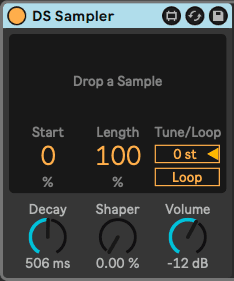
The DS Sampler Instrument.
DS Sampler makes use of your own samples to create a drum synth module.
You can load a sample by dragging and dropping it onto the upper half of the display. The Start control adjusts the position of the sample start, while the Length slider sets the sample playback length.
You can use the Tune slider to tune your sample by +/- 48 semitones. The Loop switch toggles the sample loop on and off.
The Decay knob sets the decay time of the sample’s amplitude. The Shaper parameter adds distortion to produce a punchy and gritty sound. The Volume control adjusts the overall level of the instrument.
DS Snare
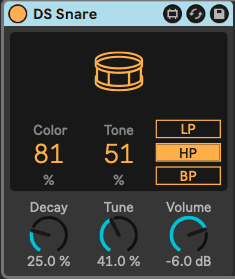
The DS Snare Instrument.
DS Snare consists of a pitched oscillator and noise, providing a snare palette ranging from a traditional acoustic snare sound, to the gated noise snare often heard in electronic dance music.
The Color parameter controls the tone of the pitched signal, while the Tone parameter controls the presence of the noise signal.
You can apply one of three different filter types to the noise signal: low-pass, high-pass, or band-pass.
The Decay knob sets the length of the snare, while the Tune parameter provides global pitch control. The Volume control adjusts the overall level of the instrument.
DS Tom
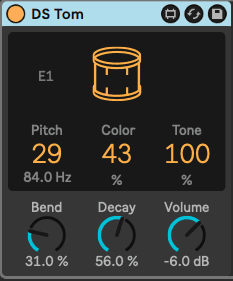
The DS Tom Instrument.
DS Tom combines an impulse with several different pitched oscillator waveforms, allowing you to synthesize toms with various timbral qualities, from deep and thunderous to sharp and tappy.
You can use the Pitch slider to tune the tom in Hz. The Color parameter controls the filter gain and cutoff, while the Tone slider controls the level of resonant band-pass filters to mimic the tuning of the drum membrane.
The Bend parameter adjusts the pitch envelope. The Decay knob sets the length of the tom, while the Volume control adjusts the overall level of the instrument.
Do this now
- Build a complete kit using only the DS devices - no samples.
- Match the Kick and the Snare to a reference record by ear.
- Put the lot in a Drum Rack and save it.
A synthesised kit weighs nothing, loads instantly and can be tuned to the track.