Creative Time Stretching, Warp Modes
Creative Time Stretching
is a technique used to manipulate audio samples to create unique and interesting sound design.
Time-stretching: Stretching a sample in time can create interesting rhythmic effects. Use the Beats, Tones, or Texture warp modes to time-stretch a sample in different ways. The Beats mode is particularly useful for rhythmic material, while the Tones and Texture modes can create more abstract and atmospheric sounds.
Pitch-shifting: Warping can also be used to pitch-shift a sample without changing its duration. Use the Complex or Complex Pro warp modes to pitch-shift a sample up or down in pitch. This can be useful for creating harmonies or adding tension to a track.
Warping is a form of Granular synthesis: Granular synthesis is a technique that involves breaking a sample into tiny grains and manipulating them individually.
In Ableton Live, there are several ways to achieve this effect. Ableton’s Warp modes allow you to manipulate the timing and pitch of audio clips independently in various ways, which can lead to the creation of granular artifacts and rhythmic effects. When using the warp modes we usually pick from a mode to maintain optimal rhythmic or tonal sound quality when changing bpm or pitch.
Depending on the goal we pick a warp mode that specializes in processing the material at hand, because there is a trade off between optimizing for rhythmic or tonal integrity at extreme settings.
With creative warping we might pick a mode with the purpose of creating certain artifacts though and thereby not use the mode that is typically used.
Open the Clip View by double-clicking the clip.
Click the Warp button in the Clip View to enable warping.
Choose one of the warp modes from the dropdown menu in the Clip View’s Sample box. Each warp mode produces different artifacts and sound design possibilities.
Experiment with the Warp settings to further manipulate the audio clip. You can adjust the Transpose, Detune, and Formant parameters to create even more unique sounds.
By experimenting with the various warp modes and their settings, you can create a wide range of unique artifacts and sound design possibilities in Ableton.
Here are some steps to do creative sound design using the different warp modes in Ableton:
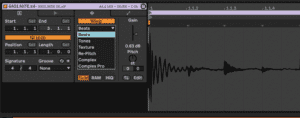
Beats mode: This mode is great for manipulating rhythmic audio clips. It is designed too preserve optimal rhythmic accuracy when syncing the audio to different tempos and maintaining the pitch. However you can use the Beats mode to create granular glitchy effects by stretching the audio in extreme ways using the warp markers.
Under preserve we have different quantization setting in addition to warping by transients
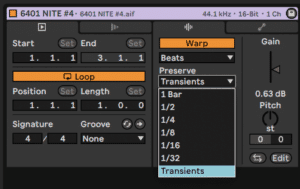
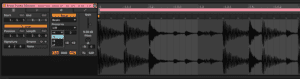
Warping extends sample length by “looping” grains of the sample. When switching of the loop mode (image above) using the pull down menu and choosing a quantized setting you can create a beat that only plays the notes that correspond to the quantization chosen. To achieve this effect you must also turn the numeric envelope value down to 0! With the settings in the image we would only play 8th notes and cut everything else out. This could also be used to create gated rhythmic effects with sustained sounds such as pads and leads.
Tones: This mode specializes in preserving tonal accuracy and pitch formonophonic material. It’s usually used to maintain optimal sound quality when transposing or tempo changing for example baselines or lead parts However by changing the tempo and pitch in extreme ways and lowering the grain size we can totally change the sound quality and create granular effects.
Texture: Texture for complex, polyphonic or noisy sounds. This mode is designed for creating granular synthesis-like effects by breaking the audio clip into tiny grains and manipulating them individually. Flux will introduce randomness into the processing of the sample. It’s great for creating pad-like textures and ambient soundscapes.
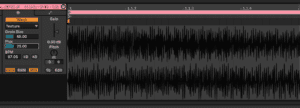
Repitch: “Turntable mode” This mode changes the pitch and tempo of the audio clip simultaneously. It’s great for creating pitch-shifted vocal effects and creating tape stop-like effects.
Complex: This mode is useful for preserving both the tonality and rhythmic quality of audio clips at various tempos and transposition settings.. It’s great for full tracks, e.g when dj ing w. Live, acapellas or acoustic instrumental parts.
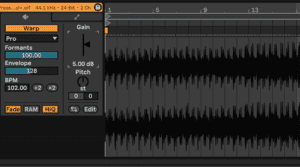
Complex Pro:This mode is similar to Complex mode but uses more advanced algorithms for even higher quality time-stretching. It’s great for preserving the character of full tracks or wherever optimal quality for timing and tonal fidelity is required.for full tracks, vocal and acoustic instrument recordings etc. It is however also more CPU intensive.
Envelope Influences the spectral characteristics of the sample. 128 should work well for most audio. Try lower values when using very high-pitched samples, and higher values when using low-pitched material.
Formants adjusts the extent to which the formants of the sample are compensated when transposing. At 100%, the original formants will be preserved, which allows for large changes in transposition while maintaining the sample’s original tonal quality.
Do this now
- Take one bar of audio and stretch it to eight using Texture mode.
- Now do the same with Complex Pro and compare.
- Push Texture's grain size and flux until it stops being the original sound.
Warp modes are granular engines. Used deliberately they are a sound design tool, not a correction.