Beat Mode, Warping using Quantized Transient Settings
The Beats mode is particularly useful for rhythmic material, while the Tones and Texture modes can create more abstract, atmospheric or also gated sounds.
Beats mode allows you to apply gated effects to audio clips using the various different quantization settings.
Using quantized transient settings with extreme tempo and pitch changes can create interesting and unique rhythmic effects in sound design.
By applying a quantized transient setting, you can snap the transients to specific rhythmic values, such as quarter notes, eighth notes, or triplets.
When combined with extreme tempo and pitch changes, the quantized transients can create glitchy, stuttering effects For example, you can take a drum loop and apply a quantized transient setting to snap the transients to eighth notes. Then, by speeding up or slowing down the tempo and adjusting the pitch, you can create a glitchy, chopped-up version of the original loop.
Select the Beat mode from the warp dropdown menu
Choose a quantization setting from the Beat mode options. This will determine the timing of the gating effect.
By using different quantization settings in the Beat mode, you can also create different rhythmic patterns by creating a quantized gating effect. For example, a 16th-note quantization will create a rhythmic gating effect that is synchronized with the tempo of your track, while a triplet quantization will create a hard 66% syncopated effect.
Under preserve we have different quantization setting in addition to warping by transients
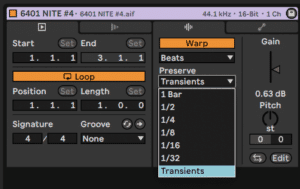
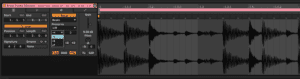
Warping extends sample length by “looping” grains of the sample. When switching of the loop mode (image above) using the pull down menu and choosing a quantized setting you can create a beat that only plays the notes that correspond to the quantization chosen. To achieve this effect you must also turn the numeric envelope value down to 0. With the settings in the image above we would only hear 8th notes and cut everything else out.
This could also be used to create gated rhythmic effects with sustained sounds such as pads and leads.
Time-stretching: Stretching a sample in time can create interesting rhythmic effects. Use the Beats, Tones, or Texture warp modes to time-stretch a sample in different ways. The Beats mode is particularly useful for rhythmic material, while the Tones and Texture modes can create more abstract and atmospheric sounds.
Pitch-shifting: Warping can be used to pitch-shift a sample without changing its duration. The further we get away from the original Pitch setting the more artifacts we will hear. While normally we might want to mitigate that a bit by choosing the different warp modes it can also be a desirable side-effect. It can be used in creative ways and Ableton is partly responsible for popularizing the Glitch genre thanks to its Warping engine.
Granular synthesis: Granular synthesis is a technique that involves breaking a sample into tiny grains and manipulating them individually. In Ableton Live, the Granulator II device is a powerful granular synthesizer that can be used to create glitchy and rhythmic sounds.
Do this now
- Warp a break in Beats mode and set the Preserve value to 1/16.
- Change it to 1/4 and hear the groove get blockier.
- Use the loop-mode pull-down to change what fills the gaps when you stretch.
Beats mode is the one warp mode that is about rhythm rather than pitch.