Algorithms, Filter, LFO Modulation, Pitch Modulation Envelope
Algorithms: Carriers vs. Modulators
The Algorithms connect the Operators in various ways:

Operators can be Carriers or Modulators.
The bottom Operators are directly connecting to the output and their envelopes control volume over time. In FM terms they are Carriers.
All other Operators, the Modulators are responsible for the timbre and their envelopes create harmonics over time.
In Operator we have the following configurations (from left to right): 1C3M, 2C2M, 3C1M, and 4C which has no Modulator so it’s just an additive Algorithm.
Filters Types
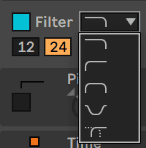
The bottom option is called a Morph filter. Use this to gradually morph between the different filter types.
Besides a Clean option, we also have some analog modeled filters. They tend to be a bit more CPU intensive.
By checking Envelope you can access a fully functional Filter envelope!
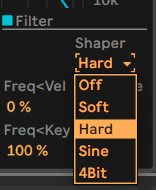
Shaper
One of the highlights of Operator’s filter is its Shaper section. Great for grimey and distorted sounds that go beyond what you would expect from an FM synth.
LFO
- The LFO Rate can controlled in 3 ways: Low happens mostly at Control rate frequencies
- High also allows for Audiorate modulation and in that sense can also be used as a fixed frequency additional FM modulator (not at a Ratio to the note).
- Sync switches the Rate to note values for in sync rhythmic LFO modulation.
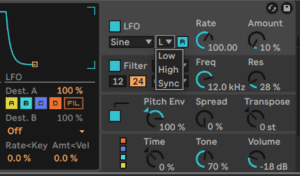
LFOs can be used to modulate various parameters of an FM operator, such as the frequency or when using Dest. B also amplitude (index) and many more transformative destinations.
For example, an LFO can be used to modulate the frequency of an FM operator to create vibrato or other types of pitch modulation effects. By adjusting the rate and depth of the LFO, you can create a range of different vibrato and modulation effects.
By combining multiple LFO modulations on different operators, you can create complex and evolving timbres that change over time in interesting and unexpected ways.
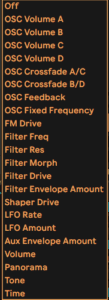
Under destination B you will also find ways to modulate the LFO amount and Rate!
Modulation B Destinations
All operators and also the filter can be LFO destinations. In addition there are many secondary Destination B routings possible:
Primary oscillator destinations are modulating pitch but fortunately under B we can also select volume, which then would be modulating the FM index(amount).
Similarly, an LFO can be used to modulate the amplitude of a carrier to create tremolo or other types of amplitude modulation effects. By adjusting the rate and depth of the LFO, you can create a range of different tremolo and modulation effects. The depth can also be controlled with an envelope for e.g delaying the onset of the LFO’s action.
Level Envelopes vs Pitch Envelopes
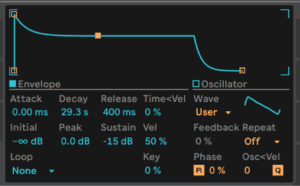
Operator's seven envelopes — one per oscillator, plus filter, pitch and LFO — are covered in the overview chapter, along with the Loop, Beat, Sync and Trigger modes. What matters here is the thing the filter and pitch envelopes can do that the others cannot: adjustable slopes. Click the diamonds between the breakpoints to bend a segment. A positive slope moves fast then slows; a negative slope stays flat and then rushes at the end; zero is a straight line. On a filter envelope that is the difference between a sweep that sounds mechanical and one that sounds played.
Pitch Modulation Envelope
After activating the Pitch module to the right of the envelope you will have access to the envelope.
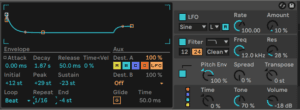
As mentioned above the pitch envelope also has adjustable slopes. Clicking on the diamonds between the breakpoints allows you to adjust the slope of the envelope segments.
The Pitch envelope can be looped or Beat synced for rhythmic repeating action. Besides targeting the operators the Pitch envelope also offers the same list of B destinations.
The pitch envelope can be turned on or off for each individual oscillator and for the LFO using the Destination A-D and LFO buttons in its display. The intensity of this envelope’s modulation of these targets can be adjusted by the Dest. A slider and the envelope can be turned off altogether via the switch in the pitch section of the shell. Like the LFO, the pitch envelope can modulate an additional parameter as chosen by the Dest. B chooser. The intensity of this modulation is determined by the Amt. B slider and the main Pitch Env value. The pitch and filter envelopes each have an additional parameter called End, which determines the level the envelope will move to after the key is released. The rate of this envelope segment is determined by the release time. Tip: If the pitch envelope is only applied to the LFO and is looping, it can serve as another LFO, modulating the rate of the first. And, since the envelope of the LFO itself can loop, it can serve as a third LFO modulating the intensity of the first!
Spread
If Spread is turned up, the synthesizer uses two detuned voices per note, one each on the left and right stereo channels, to create chorusing sounds.
Spread is a CPU-intensive effect!
Global Section:Time and Tone
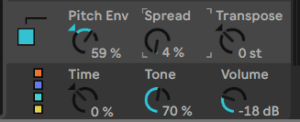
Below the Pitch section we find controls for global Time and Tone. They act very much like macro controls for anything that has to do with timing or tone.
Time would act as multiplier/scaler for envelopes i.e as a global control for all envelope rates, while Tone affects the creation of higher harmonics i.e the modulation index.
Midi Control, Polyphony and Pan
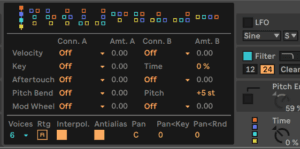
The drop down menus offer the same destinations that we see in the LFO and Pitch Modulation lesson next…
Do this now
- Take a patch you like and cycle through all four algorithms without changing anything else.
- Add the Shaper in the filter section and push it until the patch breaks.
- Route the LFO to Destination B on a modulator so the index moves rather than the pitch.
The algorithm is the single biggest change you can make to an FM patch, and it costs one click.