Drift is the synth to reach for when you want a good subtractive sound quickly. It is small, it costs very little CPU, and it has the one thing most software synths lack: a bit of unpredictability built in.
Why it sounds the way it does
Every voice in Drift is slightly, randomly detuned and phase-offset from the last — the way analogue oscillators drift out of alignment with each other. That is the whole name. It is why a Drift chord sounds wider and less sterile than the same chord from a digital synth, before you have touched a chorus.
The signal path
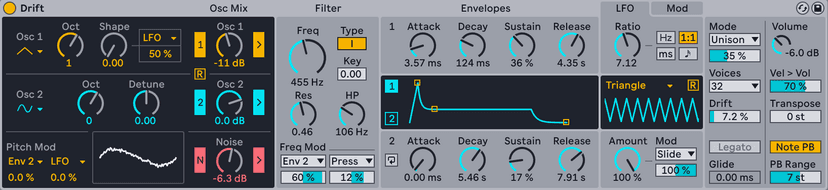
- Oscillator 1 — the main shape, with a Shape control that morphs continuously rather than switching between waveforms.
- Oscillator 2 — a second voice, tunable in semitones, with its own shape. Detune it slightly for width; tune it to a fifth for weight.
- Noise — with its own filter.
- Filter — one, but with several circuit models. The OSR model is the interesting one: it self-oscillates and behaves badly in a musical way.
- Envelopes and LFO — two envelopes, one LFO, and a Mod section that is the reason to use Drift over something simpler.
The Mod section
Two modulation slots, each with a source, a destination and an amount. That does not sound like much until you notice the source list includes velocity, note number, random per note and the envelopes — so you can make a patch that behaves differently depending on how and where you play it.
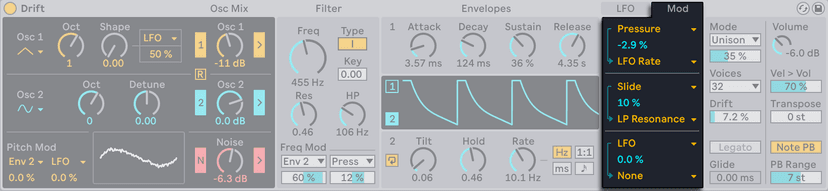
Route random per note to pitch with a tiny amount and every note is fractionally different. Route note number to filter cutoff and the patch opens up as you play higher, the way a real instrument does.
Do this now
- Load Drift. Oscillator 1 shape about a quarter of the way up, Oscillator 2 detuned by 7 cents.
- Filter to the OSR model, resonance high enough that it starts to sing.
- Envelope 2 to filter cutoff, medium attack.
- In the Mod section: velocity to filter cutoff, positive amount.
- Play the same chord soft and then hard. It is a different sound, not just a louder one.
- Now add random per note to pitch at about 3%. Hold the chord and let it move.
Five minutes, no presets, and a pad that does not sit still.