PitchLoop89
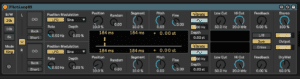
PitchLoop89 is a Max for Live audio effect developed by Dillon Bastan that can create various pitch shift effects and glitchy sounds. It is based on the classic technique of tape manipulation, where a short segment of audio is recorded, looped, and then slowed down or sped up to change its pitch. PitchLoop89 is a powerful tool for creating unique and creative pitch shift and glitch effects. After having done some granular synthesis in Sampler, Granulator2 and Grain delay some of the concepts behind the various controls should now be easy to understand.
Even though Pitchloop89 is a Max for Live device we can actually find it under Ableton’s own built in Delay/Loop section in the Browser.
We have two independent channels, each featuring the same set of controls.
To get started it might be good to lock them together using the Edit function.
From left to right we find the following controls:
Bandwidth: Choosing 10k or 5k allows to run effect at 1/2 or 1/4 of normal sample rate. This transposes current content of audio buffer in octaves, extends the delay length and reduces audio quality, which can be desired. This behaviour is modelled after early digital hardware effects. Device supports 44.1k, 48k, 88.2k and 96k sample rates. In 88.2k and 96k the effect is internally downsampled to 44.1k / 48k.
Freeze: If active, current content of the internal delay line is not overwritten, but kept infinitely and no input signal is recorded anymore. Turning this on/off whist feeding new signals and having a lot of Feedback can create very interesting fractured textures.
Back If active, the content of each Segment is played back in reverse. This works both in normal and in Hold operation.
Edit(downward arrow): If active, parameter changes on left channel are also applied to right channel. This is a good place to get started: The idea is to set both channels at the same time, and then only apply a variation to the right channel where desired!
You can Scale the Position and Segment parameter internally, making it easier to work with shorter delays, which is better for ‘classic’ pitch shifter sounds.
Position defines where the pitched version is played back in relation to the input signal. In non-Hold operation this is equivalent to a delay time parameter, although the delay time of the unit also depends on Segment size. If Hold is active, this is the beginning of the playback loop. Actual position is shown numerically in display and as moving line.
Random applies random jumps in Position, at the start of each Segment. Sonic results depends on Segment length, ranging from stutter-like effects to noise. In conjunction with high Feedback, this can be used to also create pseudo reverb-like sounds.
Segmen sets the duration of each pitch shifting delay segment. Segment size has a big influence on sonic character. In PitchLoop89, Segments can be very long. The Segment length is shown numerically in the display. If the signal informed mode “Xing’ is off, Segment length is constant. If ‘Xing‘ is on, the length varies in order to find best crossing points.
Pitch: Incoming signals can be shifted in a range of +/- 24 semitones. Pitch shifting technically always has to introduce some delay, here it can be controlled manually as a function of
Position, Segment size and actual transposition. When using pitch shifting together with feedback some sort of arpeggio is achieved. Actual pitch is is shown numerically in display
Vibrato uses either a sine or square wave to modulate the pitch. We can also use a Filter to cut some of the low or high frequencies.
Feedback: The filtered output of the pitch shifter can be feed back to its input for recursive / cascading pitched delays Also very useful for layering sounds in conjunction with the Hold function.
Router: It is possible to feed the input of the pitch shifters with either its own output (L/R), which creates two completely independent pitch shifters, or with a sum of both outputs (Sum) or with the output of the other shifter (Cross). The later one is especially interesting when inverting pitch shift sign (like +7st on the left and -7st on the right channel), creating an alternating up/down pattern
Do this now
- Put PitchLoop89 on a vocal and set a short loop with no pitch change.
- Add pitch modulation and let it drift out of tune.
- Automate the loop length across a section.
It is a glitch device pretending to be a delay. Use it where a delay would be boring.