Subtractive synthesis starts with a harmonically rich waveform and takes things away. Additive goes the other way: start with nothing and stack up sine waves until you have a sound. Operator lets you do it by hand, with a pencil.
Draw a waveform
- Load Operator and switch the display from Envelope to Oscillator.
- In the Wave chooser, pick User. The display is now empty and yours.
- Move the mouse over the display — the cursor becomes a pencil. Each vertical bar is one harmonic, and its height is that harmonic's level.
- Draw the first bar tall. That is your fundamental: a sine wave, and nothing else.
- Add the third harmonic, then the fifth, then the seventh, each a little quieter than the last.
You have just built a square wave from scratch — odd harmonics only, rolling off as they climb. Add the even ones back in and it becomes a sawtooth. This is the fastest way to actually understand what the waveforms in every other synth are made of.
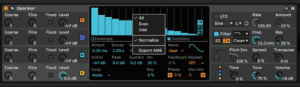
The controls that matter
- Hold Shift while dragging to change one harmonic at a time instead of painting across several.
- The switches to the right of the display move you between the first 16, 32 or 64 harmonics.
- Repeat generates the harmonics above your drawing by repeating what you drew, fading out as it goes. Low values sound brighter; high values roll off the top and leave the fundamental dominant. Turn Repeat off and everything above your last drawn harmonic is simply gone.
- Right-click for even or odd harmonics only — the quickest way to hear the difference between a square and a saw.
- Also in the right-click menu: Normalize. On, the oscillator holds its output level as you add harmonics. Off, every harmonic you add makes it louder. Leave it on unless you enjoy surprises.
Keep what you make
Right-click and export the waveform as an .ams file into Samples/Waveforms in your User Library. Drag it back onto any Operator oscillator to reload it — and it will load into Simpler and Sampler too, which is a quiet little back door into using your own single-cycle waveforms across three different instruments.
You can also copy and paste a waveform straight from one oscillator to another from the same menu.
Where it gets interesting
A drawn waveform is static — it is still one shape. The additive part starts when each harmonic gets its own envelope, which is what Operator's four oscillators are for: tune them to 1, 2, 3 and 4, give each its own level envelope, and the harmonic balance now changes over the life of the note.
That is how real instruments behave. A piano's high harmonics die away long before its fundamental does. Build that and a synth stops sounding like a synth.
Do this now
- Draw a square wave by hand in Operator's User slot - odd harmonics only, rolling off.
- Add the even harmonics and hear it become a saw.
- Export it as .ams and load it into Simpler.
Building the waveforms by hand is the fastest way to understand what every other synth is starting from.